


Postmortem meeting template
After each project, use this postmortem meeting template to identify successes, areas for improvement, prepare your agenda, document findings, and track changes your team agrees to make.
Sign up to create your own template.
Postmortem meeting template
After each project, use this postmortem meeting template to identify successes, areas for improvement, prepare your agenda, document findings, and track changes your team agrees to make.
Create your templateSign up to create your own template.
INTEGRATED FEATURES
Recommended apps




Summary
The best project managers know that a project isn't complete when the last deliverable is finished. Once the work is done, your team can reflect on what went well and what could have gone better with a project postmortem.
A reusable template standardizes questions and provides a space to add supporting records before the discussion. After the meeting, it consolidates agreed actions, owners, and deadlines.
This guide covers what to include in your template, how a product launch team applies it, and provides a practical postmortem meeting agenda.
What is a postmortem template?
A postmortem template is a structured framework for end-of-project meetings. Teams use it to plan the meeting, collect reflections and records, and organize action items. The agenda guides discussion, while the report documents findings, decisions, and agreed changes.
A project postmortem is a meeting held at the end of a project to reflect on what went well and what could be improved. It gives your team an opportunity to celebrate wins, review workflows, and identify process improvements for the next project.
Use a template after any completed project, such as a product launch, campaign, or event. For outages or major incidents, adapt the template to capture impact, timeline, and root cause analysis. Project reviews address the entire project, while incident reviews focus on specific disruptions.
Create a postmortem templateWhy teams use postmortem meeting templates
A postmortem template helps establish consistent processes across your company and builds a culture of reflection and continuous improvement. They work especially well for teams using Agile project management methods.
Implement best practices: As you conduct more postmortem meetings, you’ll find out which strategies work best. Update your template as you go so you’re ready for the next project.
Templates are flexible: Start with a template, then let each team adjust it to fit their own needs and ways of working.
Provide consistency: Holding a postmortem or retrospective after every project sets clear expectations. Over time, your team will look forward to these meetings and give more detailed feedback.
Children’s Health: Review results with project data
Children’s Health uses Asana portfolio views to bring project stats, like completed tasks, into its postmortem reviews. These records give the team real evidence to discuss as they improve their processes. Add a spot for results and their sources in your template so people can prepare with more than just their memories.
Read Children’s Health’s case study →
VSP Vision: Apply event lessons to future decisions
VSP Vision’s post-event review templates ask teams to attach highlights and lessons learned. This creates a searchable archive that helps with partner selection in future years. Store your findings somewhere the next project team can find them, and review those lessons before making similar decisions.
Read VSP Vision’s case study →
WRI: Keep reviews consistent across teams
World Resources Institute uses standard templates for lessons learned and other project processes. They also organize projects by country and donor with a shared naming system. Use consistent questions and names in your reviews so teams can find past results, compare experiences, and adjust the template for their work.
How to create a postmortem template
A postmortem template is used before and during the meeting. Follow these steps to build one your team can use again after every project. You can set up the same fields in a document, spreadsheet, or Asana project.
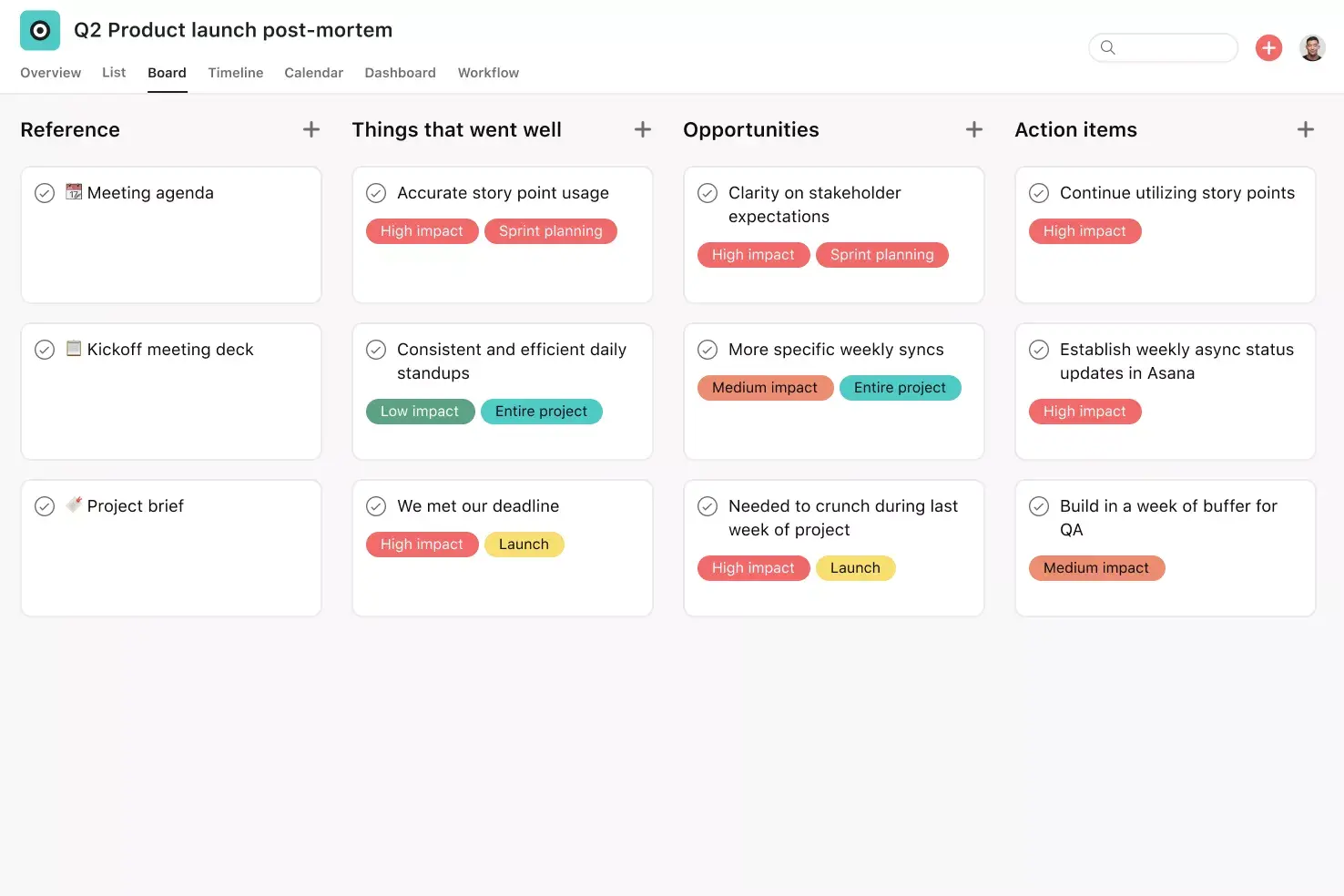
Consider an illustrative product launch team reviewing its Q2 launch. The team met its deadline, but needed to crunch during the final week. Its postmortem records what worked, what needs investigation, and the changes to make before the next launch.
Begin with the sections and prompts below. If you already use Asana, you can set up the project yourself or use Asana AI in step 4 to create a starting structure.
1. Define the sections your template needs
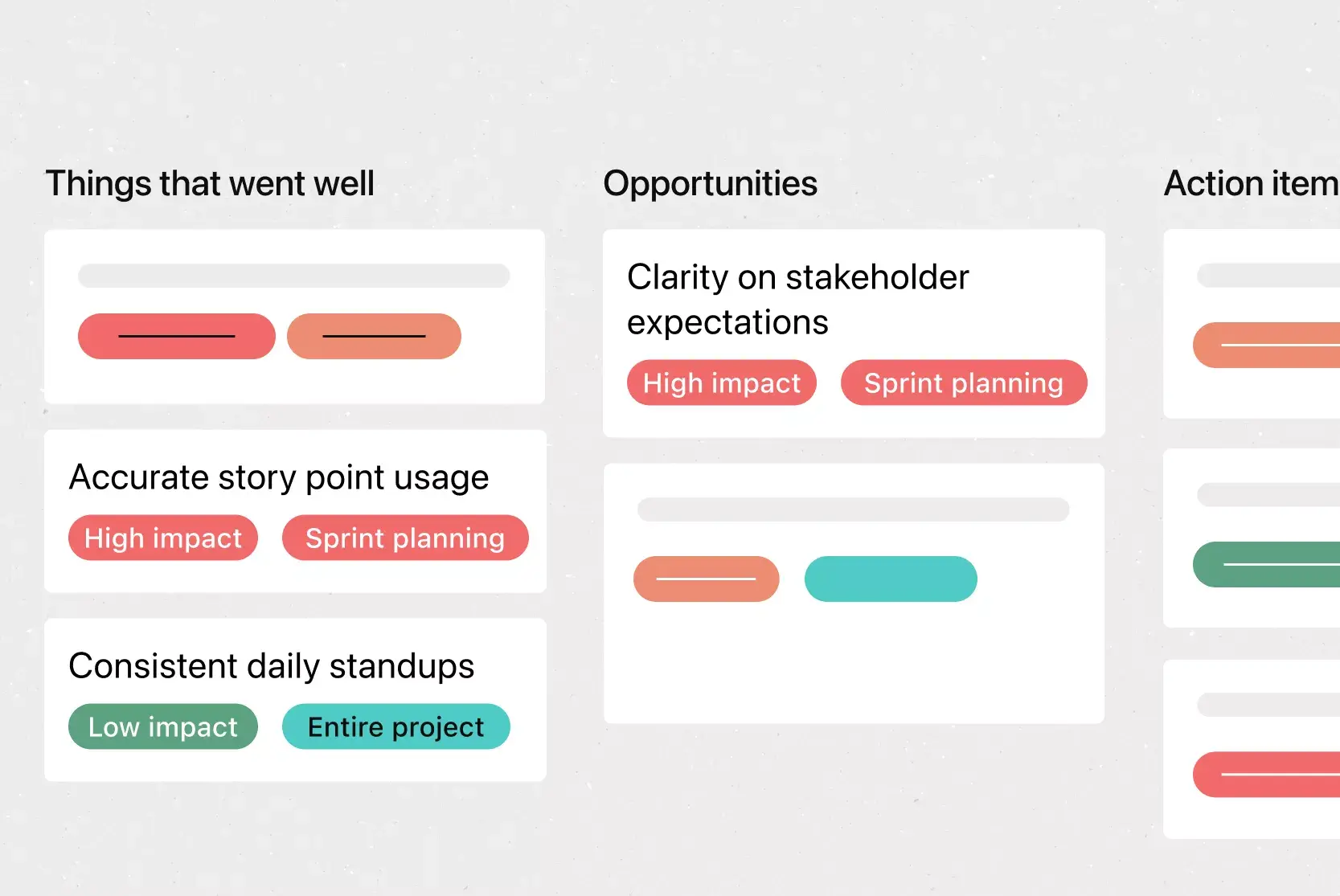
Set up the four sections from the product launch board: Reference, Things that went well, Opportunities, and Action items. Place the meeting agenda, kickoff deck, and project brief in Reference. Add the project objective, review date, and participants to the overview or reference notes.
For a project postmortem report template, use these fields and prompts. Keep the questions blank until participants add their observations and supporting records.
Report field | What to include |
Project and review details | Project name, objective, review date, facilitator, and participants. |
Expected and actual results | What was planned, what happened, and the source for each result. |
Reference | Links to the project brief, kickoff deck, meeting agenda, timeline, and relevant results. |
Things that went well | Which practices or results should be repeated? What supports that conclusion? |
Opportunities | What could improve? Record observations, contributing conditions, and questions that still need investigation. |
Action items | Record each agreed change, owner, priority, due date, status, and completion check. |
Next project | Which checklist or reusable project plan needs changing? Who will review that change? |
Communication and follow-up | Who receives the findings, who checks progress, and when will the team review open actions? |
In the launch example, “We met our deadline” belongs under Things that went well. “Needed to crunch during last week of project” belongs under Opportunities. Recording both prevents an on-time finish from hiding a problem the team should investigate.
2. Add a space for action items
Add a section where your team can list specific next steps. Each action item should have an owner, a priority, and a due date. Include the reason for the action, its status, and a completion check so the owner knows what needs to change.
For the launch team, “Build in a week of buffer for QA” becomes an assigned task. In this illustrative example, Maya Chen owns the change and sets July 10 as the due date. The task records:
What we observed: We met the launch deadline, but needed to crunch during the final week.
Agreed change: Add one week for QA to the next product launch plan.
Completion check: The reusable launch plan includes a QA milestone one week before launch.
Keep the task’s Medium impact priority separate from whether the work is open or complete. Maya updates the launch plan and asks the QA lead to review it before closing the action.

3. Include prompts to guide discussion
Add guiding questions under each section to help team members prepare input before the meeting. Ask what happened and which records support the observation before agreeing on a cause. For the launch team’s final-week crunch, useful prompts include:
What happened during the final week?
What do the launch schedule, QA work records, and stakeholder feedback show?
What might have contributed, and what do we still need to investigate?
Which change should we test in the next launch plan?
Keep unanswered questions separate from agreed actions. Record the QA buffer as an agreed change and investigate other contributing conditions separately.

4. Create your project with Asana AI
If you use Asana, Smart projects can generate a description, sections, and custom fields for your review project. Select Create → Project → Blank Project, enter “Q2 Product launch post-mortem,” and choose Set up with Asana AI. Select Generate preview, then review the result before choosing Create project. Use Retry if you want another starting point.
Compare the suggested sections with Reference, Things that went well, Opportunities, and Action items. Add or revise tasks and prompts as needed. AI-assisted project creation is available on Starter and higher plans, depending on your organization’s AI settings. You can also build the structure manually.

5. Save and refine your reusable template
After reviewing the Asana project, open the menu next to its title and select Save as template. Name the template, choose who can access it, and select Create a new template. Review the default tasks, assignees, and dates in your project template. Saving a reusable template is a separate step from creating the project with AI.
Run your first postmortem with the template, then ask the team what worked and what felt unnecessary. Update the questions based on that feedback. For the launch example, improve the review prompts in the postmortem template and add the QA milestone to the reusable launch plan. These are two different updates.
If you use another tool, keep a blank version of the report fields and questions as your starting structure for the next review.
How to run a postmortem meeting
A well-run postmortem meeting turns reflection into action. Use these steps to prepare the discussion, agree on changes, and make sure someone follows through.
Prepare the team and records. Choose a facilitator, confirm attendees, and send the agenda. Ask participants to add observations and supporting records to the template before the meeting. Bring the project brief, project scope, intended results, and relevant feedback.
Set a blameless tone. Explain that the review focuses on decisions, processes, and working conditions. Encourage participants to describe events without assigning blame and ensure everyone can contribute.
Review results and timeline. Compare the plan to actual outcomes, then review milestones, deadlines, and deliverables. Use the timeline to separate recorded facts from recollections. A project may meet its deadline yet still reveal issues to address.
Discuss wins and opportunities. Celebrate effective practices and team contributions. For challenges, identify supporting records and possible contributing factors. Record unresolved questions for further investigation rather than treating assumptions as proven causes.
Agree on actions and completion checks. Select improvements the team can implement. Assign each action an owner, priority, due date, and completion criteria. Confirm which reusable plan or checklist needs updating.
Share findings and follow up. Send the report to the relevant stakeholders, confirm who will monitor open actions, and review changes before the next project. In Asana, the organizer of a 5 Whys review notes and schedules tasks, followed by communication and follow-up tasks with due dates. Give your own review an owner beyond the meeting, too.
Postmortem meeting agenda
Use this suggested 30-minute agenda as a starting point. Adjust the time to match the project’s complexity, and collect observations and records beforehand.
Time | Discuss | Leave with |
0–5 minutes | Confirm the objective and a blameless approach. | Shared review scope |
5–10 minutes | Compare the plan, actual results, and important dates. | Agreed facts and open questions |
10–18 minutes | Discuss what went well and opportunities to improve. | Practices to repeat and issues to investigate |
18–25 minutes | Choose improvements and assign responsibility. | Actions, owners, priorities, and due dates |
25–30 minutes | Confirm completion checks and who will share the report. | Follow-up and communication plan |
Integrated features
Board view. Organize the review into columns such as Things that went well, Opportunities, and Action items. Keep observations and follow-up tasks visible as cards.
Forms. Collect team observations before the meeting. Submissions create project tasks, giving the facilitator material to review before the group agrees on causes or actions.
Custom fields. Track details like priority and status consistently. Keep impact labels separate from completion so high-impact actions remain visible until finished.
Adding tasks to multiple projects. Include the same follow-up task in both the postmortem project and the project where the improvement will occur. Teams can view and update a single task without maintaining separate copies.
Recommended apps
Jira. Connect engineering issues with review follow-up so technical and business teams can coordinate the agreed changes.
Zendesk. Create or link Asana tasks from tickets to keep customer context with the work needed to resolve an issue.
Gmail. Turn relevant emails into Asana tasks so feedback and follow-up requests stay connected to the review.
Slack. Turn discussion points and action requests into trackable tasks with assignees and due dates.
Create a postmortem template with Asana
Once your team agrees on a change, assign responsibility for implementation. Build your postmortem project in Asana to keep the agenda, findings, and follow-up tasks organized, then save the structure for future reviews.
FAQs about postmortem templates
A postmortem template is a reusable structure for preparing a project review, recording findings, and tracking improvements. It includes project objectives and results, supporting records, successes, opportunities, and action items. Teams can use it as a document, spreadsheet, or project management tool, with an agenda to guide the meeting and a report to capture decisions.
Structure a postmortem meeting around preparation, factual review, discussion, and follow-up. Agree on the project and purpose, compare intended results with actual outcomes, and review the timeline. Discuss successes and opportunities without blaming individuals. Finish by confirming actions, owners, due dates, and completion checks, plus who will share the findings and monitor progress.
Start a project postmortem report with the project’s objective, participants, and review date. Compare expected and actual results, link to supporting records, and summarize what worked and what needs improvement. Record decisions and actions with owners, deadlines, and completion checks. For an incident report, also document the impact, incident timeline, contributing causes, and prevention measures.
A project postmortem reviews an entire project after completion, focusing on what went well and how to improve future projects. An incident postmortem focuses specifically on an outage or service disruption, analyzing root causes and prevention measures.
A blameless postmortem examines systems, decisions, and working conditions without blaming individuals. It gives team members a way to share honest observations and investigate why problems occurred. Blameless reviews still assign responsibility: people own the investigation, agreed improvements, deadlines, and follow-up needed to change how the team works.
Related templates

Create a postmortem template with Asana
Build a postmortem template to improve your future projects.