10 best resource planning software for scheduling and planning

85% of Fortune 100 companies choose Asana¹






Summary
Work slows when teams commit to more than they can realistically deliver. Without a reliable way to compare incoming work with capacity, managers can overload the same people, miss staffing gaps, or push timelines without sufficient information. Resource planning gives teams a structured way to plan capacity, assign work, and adjust schedules before projects fall behind.
The right software platform also helps teams connect resource decisions to business goals. Leaders can compare demand with available capacity, shift work as priorities change, and ensure high-value projects get the time and attention they need.
Effective marketing strategy templates
Streamline your marketing efforts with customizable Asana templates. Plan, track, and carry out your marketing strategy to reach your goals faster.
What does resource planning software do?
Resource planning software shows who is available, what they’re working on, and whether the team has enough time to take on more work. Instead of estimating capacity with spreadsheets, calendars, and Slack threads to determine whether your lead designer can support a new project, you can check a single shared dashboard.
These tools help teams compare ambitious plans with actual capacity. Managers can assign work, identify overloaded teammates, review past project data, and make smarter decisions before timelines get wobbly.
What features should you look for in resource planning software?
When vetting a new planning solution, don’t get distracted by a flashy UI. Look for the big four pillars of resource management:
Capacity management: This is the bird’s-eye view. Can you see who is overbooked, who is on vacation, and who has a light load? The best tools use "heat maps" (with colors like red for overbooked and green for available) to make this instant.
Skills tracking: Not all resources are interchangeable. A tool should let you tag team members by expertise (e.g., Python Developer or Bilingual Copywriter) so you can assign the right person, not just the nearest warm body.
Time tracking and forecasting: To plan the future, you must understand the past. You need a way to track actual hours worked versus estimated hours, so the software can predict future project timelines with greater accuracy.
Scenario planning: What happens if a major client signs tomorrow? What if a key employee leaves? High-end tools allow you to drag and drop hypothetical projects to see how they impact your team’s bandwidth before you commit.
Comparison table: Top resource planning software solutions
Software | Best for | Standout feature |
Asana | Overall resource planning | Workload view and goal setting |
Float | Project scheduling | Visual drag-and-drop timeline |
Kantata | Professional services teams | Financial and margin tracking |
Runn | Resource forecasting | Long-term capacity modeling |
Resource Guru | Simple resource scheduling | Clash management |
Mosaic | Capacity planning | AI-driven staffing suggestions |
Smartsheet | Spreadsheet-style planning | Grid and Gantt views |
Jira | Technical teams | Deep integration with development workflows |
Teamdeck | Time tracking and availability | Integrated timesheets and scheduling |
Forecast | AI-powered forecasting | Auto-scheduling and project health insights |
Read: Best task management software for teams
How we chose the best resource planning solutions
We focused on practical resource planning needs rather than marketing claims. We looked at how each tool supports common planning workflows, such as assigning work, managing availability, reviewing capacity, tracking workloads, and planning future projects.
We also considered how each platform fits different team sizes and working styles. Some tools work best for simple scheduling, while others support more complex planning across departments, portfolios, or client projects. Our goal was to highlight options that address different resource-planning problems, so teams can compare tools based on how they actually plan and manage work.
1. Asana: Best overall resource planning software
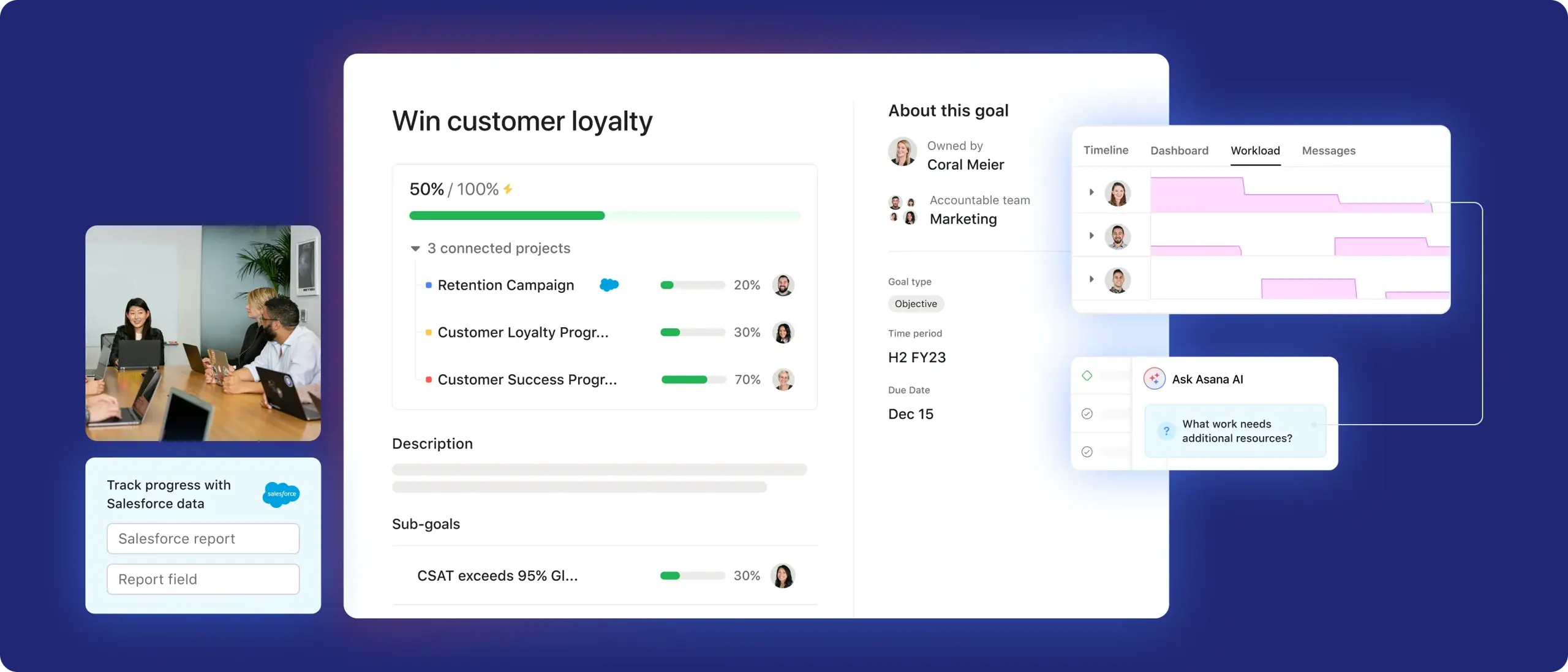
Asana earns the top spot because it connects resource planning to the teams that manage day-to-day work. Resource conflicts often occur when teams plan capacity in one place, manage tasks in another, and discuss updates elsewhere. Asana brings goals, projects, tasks, timelines, workloads, and team collaboration into one shared system, so managers can plan capacity without adding another disconnected platform.
Asana’s workload features give managers a real-time view of what each person has on their plate. If a project manager sees that a designer has too much assigned work, they can reassign tasks, shift deadlines, or adjust priorities from the same system. Teams can also use workflow automation to streamline updates, set goals that connect resource decisions to business priorities, and use Asana AI to summarize work, surface next steps, and make planning decisions faster.
Pros and cons
Pros: Strong user interface; supports capacity points for effort-based planning; includes workflow automation, goal setting, Asana AI, AI teammates, and strong team collaboration features; excellent mobile app.
Cons: Advanced resource features, such as Workload, are available only in higher-tier plans; very small teams may need a simpler setup.
2. Float: Best for project scheduling
Float works well for teams that think in timelines, schedules, and availability. The platform feels like a digital planning board, which makes it easy to see when people start work, finish work, take time off, or move to another project.
Float fits fast-moving teams such as agencies, studios, and production teams where schedules change often. If a client delays a project or a shoot is rescheduled, teams can adjust schedules quickly without having to rebuild the entire plan.
Pros and cons
Pros: Fast, responsive interface; useful tentative project planning; integrates with Slack and Google Calendar.
Cons: Lacks deeper project management features, such as native file storage and complex task dependencies.
3. Kantata: Best for professional services teams
Kantata is suitable for businesses that sell time, expertise, and project delivery. Agencies, consultancies, and other professional services teams need more than a schedule. They need to understand resource utilization, margins, budgets, staffing, and delivery risk.
Kantata also connects resource planning with financial performance. Teams can track billable utilization, project budgets, margins, and resource needs on a single platform. It works best for organizations that have moved beyond simple task management and need deeper business reporting.
Pros and cons
Pros: Strong financial reporting; advanced resource modeling; built-in business intelligence tools.
Cons: Steeper learning curve; may feel too complex or expensive for internal creative teams that do not bill clients.
Explore Asana's resource planning features and capabilities
Asana is the leading software for project management, according to G2. See all your work in one place so you can prioritize what matters most.
4. Runn: Best for resource forecasting
Runn works well for teams that need to plan beyond the current sprint or project cycle. Instead of focusing only on this week’s schedule, Runn helps teams look months ahead and understand future staffing needs.
Teams can use placeholder resources to model potential demand. For example, a leadership team could see that three new projects in Q3 may require two additional senior developers. That makes Runn useful for companies that connect project planning with hiring, staffing, and long-term capacity decisions.
Pros and cons
Pros: Strong charts for long-term capacity planning; useful bench-time tracking; practical forecasting views.
Cons: Project-level task management is less detailed than tools such as Asana or Jira.
5. Resource Guru: Best for simple resource scheduling
Resource Guru offers straightforward scheduling and resource allocation. It helps teams avoid booking conflicts by warning managers when someone already has work assigned, time off scheduled, or another commitment.
The platform works well for teams that want a shared, calendar-style resource-planning tool without too much complexity. It can also manage non-human resources, such as rooms, equipment, vehicles, and production spaces, which makes it useful for operations-heavy teams.
Pros and cons
Pros: Quick setup; easy for non-technical users; handles people, rooms, and equipment well.
Cons: Limited advanced reporting; not ideal for teams that need detailed subtask tracking.
6. Mosaic: Best for capacity planning
Mosaic helps teams understand capacity, workload balance, and staffing needs. It uses project and team data to show who has room for more work, who may have too much assigned, and where demand may exceed available resources.
The platform also helps managers match people to work based on skills and availability. That makes Mosaic a strong option for teams that want capacity planning to support better staffing decisions, not just schedule management.
Pros and cons
Pros: Useful AI-assisted recommendations; modern interface; strong focus on workload balance.
Cons: Can cost more than basic scheduling tools; AI-supported planning works best when teams have enough reliable data in the system.
7. Smartsheet: Best for spreadsheet-style planning
Smartsheet suits teams that like the structure of spreadsheets but need more power than a standard Excel workbook offers. It provides managers with a familiar grid-based workspace, along with added automation, reporting, workflows, and portfolio views.
With its resource management capabilities, Smartsheet can turn project and staffing data into capacity views, utilization reports, and workload plans. It works well for teams that already think in rows, columns, formulas, and structured project data.
Pros and cons
Pros: Highly flexible; strong automation; useful for teams that like formulas, grids, and custom workflows.
Cons: Can feel less modern than visual planning tools; requires setup work to get the best results.
8. Jira: Best for technical teams
Jira makes sense for software development and technical teams that already manage work in the Atlassian ecosystem. Resource planning in Jira can be linked to sprints, issues, backlogs, roadmaps, and engineering workflows.
Engineering managers can plan capacity using story points, sprints, releases, and team velocity, rather than relying solely on hours. That makes Jira a strong fit for Agile and Scrum teams that need resource planning that aligns with how developers already work.
Pros and cons
Pros: Strong fit for development workflows; powerful for Agile and Scrum; highly customizable reporting.
Cons: Steep learning curve; interface may feel too technical for non-developers.
9. Teamdeck: Best for time tracking and availability
Teamdeck combines resource scheduling, time tracking, leave management, and reporting. It works well for teams that need to compare planned work with actual time spent.
We’re highlighting Teamdeck’s comparison features because many teams underestimate how long work takes. Teamdeck helps managers review the gap between estimates and actuals, which can lead to better planning, budgeting, and workload decisions over time.
Pros and cons
Pros: Good value for smaller teams; combines scheduling, time tracking, and leave management in one view.
Cons: Mobile experience is less polished than some competitors'; the reporting interface may feel dated for some users.
10. Forecast: Best for AI-powered forecasting
Forecast uses automation and project data to support planning decisions. It can help teams estimate timelines, plan staffing, review project health, and understand how future work may affect capacity.
The platform is well-suited for growing companies that want to reduce manual planning and connect resource planning to project delivery. Forecast works best when teams have enough historical data for the system to make useful recommendations.
Pros and cons
Pros: Strong automation; useful project health indicators; end-to-end platform for planning and delivery.
Cons: Premium pricing; AI-supported recommendations depend on the quality and volume of past project data.
How to choose the right planning tool for your team
Choosing resource planning software starts with fit. The right tool should align with your team size, planning habits, reporting needs, and your biggest operational pain points.
Read: Best task management software for teams1. Match the tool to your team size
A 10-person agency has different needs than a 500-person enterprise. Small teams should prioritize speed, ease of use, and simple scheduling. If the tool takes too much time to update, people will stop using it.
Larger teams often need permissions, team structures, department-level views, and portfolio reporting. For example, a marketing manager may need to view campaign workloads without sorting through every engineering project on the company roadmap.
2. Identify your biggest resource allocation problems
Identify where your current process breaks down most often. Different tools solve different problems, so your biggest pain point should guide your shortlist.
If your team often misses deadlines, look for time tracking, project estimates, and reporting that compares planned hours with actual hours.
If people feel overworked, look for workload views, capacity limits, and heat maps that show when someone has too much on their plate.
If projects lose money, look for budget tracking, utilization reports, margin tracking, and financial forecasting.
3. Test the tool with a pilot team
Do not choose a resource planning tool based solely on product screenshots. These platforms can look simple on a website but feel very different during daily use. Run a short pilot with one team before you roll the tool out more widely. Ask whether people can update their work quickly, whether managers trust the data, and whether the reports help leaders make better staffing decisions. If the tool creates more admin work than it delivers in value, keep looking.
Read: Best campaign management software for marketing teamsHow to implement resource planning software at your organization
Project management tools work best when teams understand why the organization chose them and how they should use them. A simple rollout plan can help you prepare data, support adoption, and turn the tool into a practical planning system.
Explain the purpose before rollout. Tell teams why the organization needs resource planning software before you ask them to use it. Position the tool as a way to protect people from burnout, document team capacity issues, and give managers the decision-making data they need to adjust deadlines and priorities, or request more support.
Prepare your team and project data. Resource capacity software works best when the underlying information is accurate. Before launch, confirm each team member’s role, skills, working hours, time off, active projects, and current assignments.
Choose an internal tool owner. Assign one person to own setup, answer questions, and help teams use the software during onboarding. A dedicated owner provides employees with a reliable point of contact and helps prevent minor issues from slowing adoption.
Start with the most important features. Avoid rolling out every feature on day one. Start with core use cases like resource scheduling, workload views, and capacity tracking. Once teams get comfortable, add more advanced functionality such as time tracking, forecasting, automation, notifications, or AI-powered project planning.
Use feedback to refine the process. Ask managers and team members what works, what slows them down, and which metrics they actually use. Resource management tools should help teams optimize bottlenecks, monitor project progress, streamline staffing decisions, and prioritize work with more confidence.
Transform resource planning into performance with Asana
The best resource management software should help teams plan work, balance capacity, and visualize workflows at a glance. Asana brings goals, tasks, timelines, project resources, and team bandwidth into one place, so managers don’t have to guess who is available or which projects need attention.
With Asana, teams can monitor resource utilization, spot overextended teammates, and adjust work with a few clicks. That means stronger teamwork, smarter planning, and a simpler way to keep projects moving. Get started with Asana today.
Try Asana now


FAQs about resource planning software
Project managers, department heads, operations leaders, and resource managers use resource planning software to schedule work based on available people, skills, and time. It is especially useful for professional services teams, creative studios, software teams, agencies, consultancies, and other organizations where people are the main resource.
Teams may also use resource planning software alongside project management platforms, time-tracking tools, HR systems, or Microsoft apps to get a fuller picture of schedules, workloads, and delivery timelines.
A team should consider resource planning software when spreadsheets, shared calendars, or manual updates begin to create confusion. That often happens when a team reaches 10 to 15 people, manages several active projects at once, or relies on the same people across multiple workstreams.
Common warning signs include missed deadlines, overloaded employees, uneven workloads, and limited insight into project progress. At that point, a purpose-built tool can help teams plan ahead rather than react after problems surface.
Yes, resource planning solutions can help small teams as long as the tool feels user-friendly and easy to maintain. Smaller teams usually do not need a complex enterprise system, but they do need a practical way to see who is available, what work takes priority, and where time is going.
For small teams, the biggest benefit is better day-to-day planning. A lightweight tool can help leaders assign work, protect focus time, avoid overbooking, and understand which projects contribute most to profitability.
Resource planning tools help teams compare available time against planned work. In simple terms, supply means the team’s total available hours, while demand means the work already assigned or expected in the pipeline.
The software shows when people have room for more work and when the schedule is too busy. Many cloud-based tools also include workload views, utilization reports, and alerts that help managers spot problems before deadlines or budgets slip.
Project management software focuses on the work itself, such as tasks, deadlines, deliverables, dependencies, kanban boards, and gantt charts. Resource planning software focuses on the people and capacity behind that work, including availability, skills, schedules, utilization, and workload balance.
Many platforms combine both sets of capabilities. The key features to look for depend on your team’s needs, but strong resource planning tools should help managers assign the right people to the right work at the right time.