10 best strategic planning software for teams

85% of Fortune 100 companies choose Asana¹






Summary
Strategic planning no longer works as a static document that teams revisit once or twice a year. In modern work, priorities change quickly, and teams need a practical way to connect long-term goals to their day-to-day work. Strategic planning software helps teams set goals, monitor performance, assign ownership, and turn strategy into measurable business outcomes.
Create a prioritization matrix template
Take the guesswork out of task prioritization by creating a prioritization matrix template in Asana. Prioritize your work by business impact and expected effort, so you can be confident you’re focusing on the most important work.
What is strategic planning software?
Strategic planning software helps organizations plan, manage, and track progress toward business goals. Instead of keeping strategy in spreadsheets, slide decks, or siloed documents, these platforms give you a single place to manage goals, initiatives, milestones, owners, and performance data.
The best strategy software goes beyond basic task management. They help leaders see how work supports company priorities, spot risks earlier, and make informed decisions based on real progress.
What features should strategic planning software offer?
To be effective in modern workplaces, business planning tools must do more than display a Gantt chart. You should look for key features, like:
Goal-setting hierarchy: The ability to nest sub-goals and milestones under major objectives so you can track process performance.
Dynamic dashboards: Real-time data visualization that replaces manual reporting and status update meetings.
Collaboration tools: Features that connect specific projects to strategic goals, so that everyone is working toward the same outcome.
AI-powered insights: Predictive analytics that flag at-risk goals before they fail.
Coordination hubs: A space for collaboration and discussions where decisions are documented alongside the data.
Comparison table: Top 10 strategic planning software platforms
Platform | Best For | Standout Feature |
Asana | Strategic planning management | Asana AI and goal hierarchy |
Cascade Strategy | Company-wide implementation | Strategy execution platform |
Perdoo | OKR tracking | Goal alignment |
Envisio | Public sector and government | Public dashboards |
ClickUp | Customizable workflows | High versatility |
AchieveIt | Enterprise strategy | Large-scale execution |
Profit.co | Performance management | Integrated coaching |
ITONICS | R&D and innovation | Trend scouting |
StrategyBlocks | Visual mapping | Visual block UI |
ClearPoint | KPI reporting | Automated reporting |
Read: The 10 best workflow management software tools
How we evaluated the best strategic planning tools
We looked beyond basic feature lists and focused on how each platform helps teams turn strategy into measurable work. Our review prioritized tools with practical planning features, ease of adoption, integrations, reliable reporting, and AI capabilities that support real workflows. We also considered how well each platform helps teams assign ownership, monitor progress, and adjust plans as priorities change.
1. Asana: Best for strategic planning management
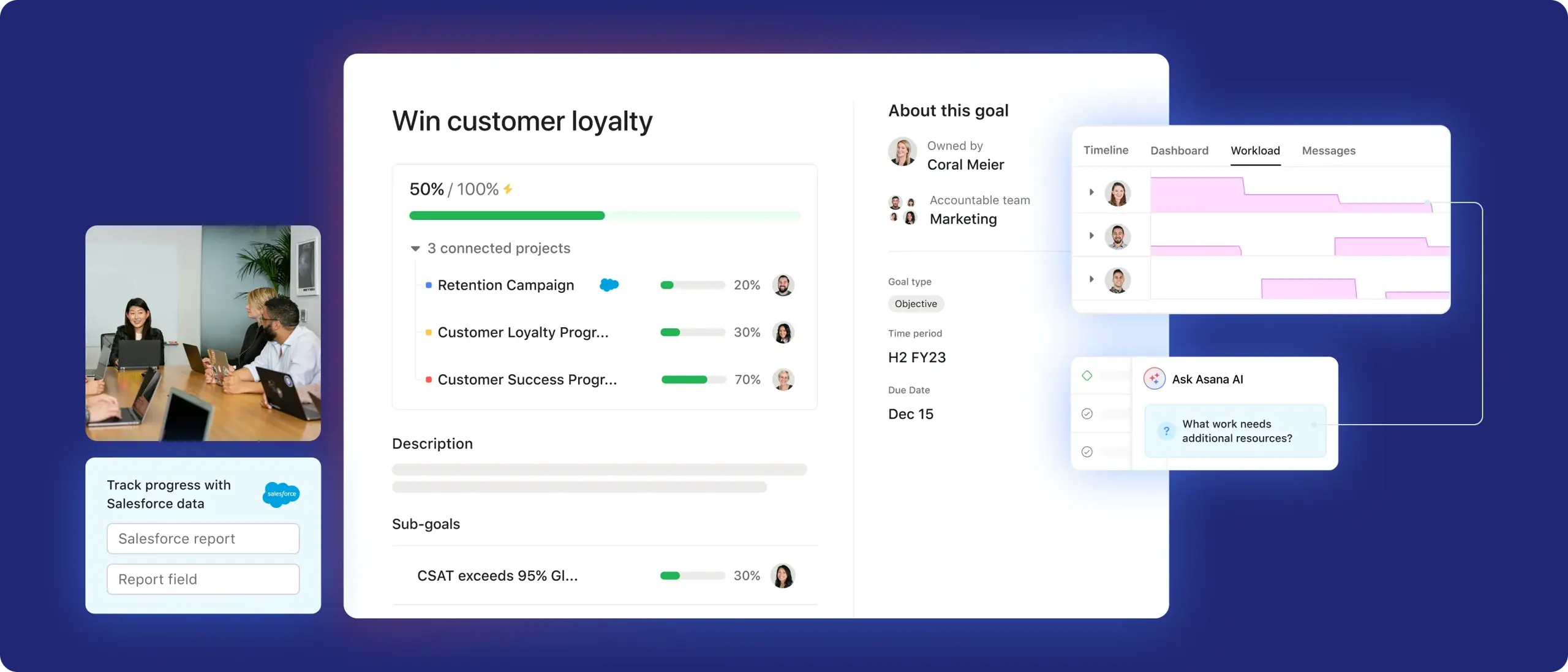
Asana has evolved into a sophisticated, AI-powered strategy execution engine. It understands that goal-setting without a plan is just wishful thinking. Through its Work Graph methodology, Asana ensures every task is anchored to a larger business need.
Asana is an ideal software solution for teams of all sizes, thanks to its seamless integration with Asana AI and its dedicated goals feature. Asana AI offers virtual teammates and AI workflows that summarize progress across hundreds of projects and identify bottlenecks before they derail your strategic objectives. It enables leaders to set high-level goals and automatically connect them to the work underway in the trenches, providing unparalleled transparency and momentum.
Pros and cons
Pros: Exceptional UI; powerful AI-driven insights; integrates with over 200+ tools; very easy for teams to adopt quickly.
Cons: Its Goals feature requires a higher-tier subscription; it needs to be configured with a clear structure.
2. Cascade Strategy: Best for implementing company-wide strategies
Cascade excels at managing the complexity of large organizations. It’s designed to align thousands of employees across global offices toward a unified vision. Cascade’s Strategy Tree visualizes how different departments contribute to the overarching business strategy. Its emphasis is on strategy execution, transforming a multi-year plan into actionable stages that can be tracked with surgical precision.
Pros and cons
Pros: Purpose-built for strategy (not just projects); excellent Strategy Planner interface; strong emphasis on accountability.
Cons: Steeper learning curve for non-strategic roles; can be "too much tool" for small businesses and startups.
3. Perdoo: Best for OKR tracking
Perdoo is known for its Roadmap feature, which illustrates the connection between OKRs (Objectives and Key Results) and KPIs (Key Performance Indicators). Unlike most strategic planning process tools that treat these elements separately, Perdoo understands that your daily metrics support your long-term goals. It is straightforward and user-friendly, and helps avoid goal fatigue.
Pros and cons
Pros: Dedicated OKR coaching and resources; well-designed interface; excellent for improving employee engagement.
Cons: Limited project management and planning capabilities, focused strictly on the OKR framework.
Explore Asana's campaign management features and capabilities
Asana is the leading software for project management, according to G2. See all your work in one place so you can prioritize what matters most.
4. Envisio: Best for public sector and government agencies
Government agencies have unique needs, specifically, high levels of transparency and public accountability. Envisio is tailored specifically to this niche. It enables public sector leaders to create Public Dashboards, outward-facing pages where citizens can see exactly how the government is progressing toward community goals, such as infrastructure or resource management. It’s about building trust through data-driven decisions.
Pros and cons
Pros: Specialized for government workflows; simplifies complex reporting; great for stakeholder transparency.
Cons: Less flexible for private-sector tech companies; the UI feels more utilitarian than modern.
5. ClickUp: Best for customizable project workflows
ClickUp is versatile and offers teams a range of strategic planning features. You can view your strategy as a list, a board, a mind map, or a timeline. It’s also incredibly modular, making it ideal for organizations with a specific way of working. For a creative agency or a fast-moving web development team, this flexibility allows the strategic plan to adapt to the team's workflow rather than forcing them to change to fit the software’s functions.
Pros and cons
Pros: Customizable; feature-rich even at lower price points; great "everything" view.
Cons: The sheer number of features can lead to a cluttered experience, and it takes significant time to set up properly.
6. AchieveIt: Best for enterprise strategy tracking
AchieveIt helps large enterprises turn strategic plans into measurable progress. Its execution management platform collects updates from teams, aggregates data into executive reports, and provides leaders with an overview of performance. AchieveIt enables data-driven decision-making, forecast reviews, and scenario planning as priorities change. With up-to-date data in one place, teams make informed decisions without needing spreadsheets or status updates.
Pros and cons
Pros: Unmatched for large-scale organizational oversight; customer success support; eliminates status meeting culture.
Cons: High price point; lacks the bottom-up task management features of Asana or Jira.
7. Profit.co: Best for performance management and coaching
Strategy is only as good as the people implementing it. Profit.co bridges the gap between organizational goals and individual performance. Profit.co integrates performance reviews and 1-on-1 coaching directly into the goal-tracking process. If a Key Result is lagging, a manager can immediately see it and address it during a performance check-in. It streamlines strategy into a development opportunity for team members.
Pros and cons
Pros: Comprehensive HR and performance features; built-in OKR templates; emphasis on employee growth.
Cons: The UI can feel a bit dated; it might feel micro-managey if not implemented with a positive culture.
8. ITONICS: Best for R&D and product innovation teams
For companies where strategy is driven by technology and research, ITONICS is the gold standard. It’s less about tracking tasks and more about mapping the future. ITONICS specializes in Trend Scouting and Technology Radar. It allows R&D teams to identify emerging market shifts and map them directly into their strategic roadmap. If your strategy relies on being first to market with new products, this provider could be a good fit.
Pros and cons
Pros: Advanced visualization for innovation; great for long-term "horizon" planning; connects market trends to internal projects.
Cons: Very niche; likely too complex for service-based businesses or standard retail.
9. StrategyBlocks: Best for visual strategy mapping
Some people need to see the big picture literally. StrategyBlocks uses a unique visual block system, Cascading Visuals, to represent a strategy's health. Each block represents a strategic initiative, and its color and size change based on performance metrics. It provides an instant, at-a-glance health check of the entire company without requiring you to read a single report.
Pros and cons
Pros: Unique, highly visual interface; great for visual thinkers; easy to see dependencies.
Cons: Not ideal for managing the granular details of a project; can become messy with too many data points.
10. ClearPoint Strategy: Best for KPI dashboards and reporting
If your board of directors is obsessed with data and KPIs, ClearPoint is the answer. It is built to produce board-ready reports with minimal effort. ClearPoint excels at portfolio management. It can pull information from multiple sources and present it in an organized, professional dashboard. Its automation engine handles the heavy lifting of report generation, ensuring that the data presented to leadership is always accurate and up to date.
Pros and cons
Pros: Best-in-class reporting; high degree of data integrity; very customizable dashboards.
Cons: Higher price point; can feel more like a "reporting tool" than an "action tool."
How to choose the best strategic planning software for your team
The best strategic planning software matches your team’s specific planning, workflow, and reporting needs. Some teams only need simple project tracking, whereas others require advanced dashboards, portfolio overviews, financial planning, or executive reports.
Read: The best project management softwareBefore comparing different platforms, identify the specific problem you want the software to address.
Start with these questions:
How many teams will use the platform?
Do you need simple goal tracking or comprehensive strategy execution management?
Who will own updates, reporting, and follow-up?
What tools does your team already use every day?
Do leaders need dashboards, scorecards, or board-ready reports?
How easy will it be for non-technical users to adopt?
Once you know the answers, shortlist tools that match your planning style. A smaller team may do better with a flexible work management platform, while a large enterprise may need dedicated strategic planning software with built-in reporting, permissions, and governance.
The right tool should make your strategic planning process easier to manage, not add another layer of admin work.
How to implement strategic planning
Strategic planning becomes more manageable when you break down large goals into trackable tasks. The right strategic planning software optimizes priorities, ownership, milestones, and resource allocation, eliminating the need for multiple slide decks, spreadsheets, or lengthy email threads.
11 best kanban boards software tools compared.Start by identifying the business goal and defining success criteria.
Next, review performance data, customer feedback, and relevant use cases before finalizing the plan.
After gathering this information, break the strategy into initiatives, projects, owners, deadlines, and key milestones.
Map resource allocation so that each team understands the available time, budget, and support.
When making your plan actionable, connect your strategic planning software to Slack or Microsoft Teams, and other daily tools to ensure updates are not missed.
During implementation, regularly review progress, adjust priorities as needed, and document any changes.
Bring your strategic plan to life with Asana
If you want a tool that grows with you, Asana is the most logical starting point for most modern teams. It bridges the gap between high-level executive goals and the day-to-day grind. With Asana AI, you can stop wondering if your team is working on the right things and start seeing the impact of every hour spent. It turns strategic planning from a quarterly presentation into a daily habit.
Get started with Asana today.
Try Asana now


FAQs about strategic planning software
Strategic planning software helps teams connect high-level business goals to the work that advances them. Instead of storing goals in a slide deck or spreadsheet, teams can break each objective into projects, tasks, owners, deadlines, and measurable outcomes. Many strategic planning tools also include dashboards, scorecards, and progress reports, so leaders can see which goals are on track, which ones need attention, and where teams may need more support.
Many teams start strategic planning in Excel because it is familiar, flexible, and inexpensive. However, spreadsheets become harder to manage as more people, departments, and initiatives get involved. Excel does not offer teams the same real-time updates, automated reminders, goal tracking, dashboards, or task-level accountability as dedicated strategic planning software does. If your team needs to manage company goals, track milestones, assign owners, and report progress to leadership, a dedicated tool will usually work better than a static spreadsheet.
Most teams can see early results from strategic planning software within the first 30 days, especially in better reporting, clearer ownership, and easier progress tracking. Performance results usually take longer because teams need time to adopt new planning habits, review cycles, and accountability processes. In many cases, companies start to see stronger goal execution over two or three quarters as leaders use the software to review progress, adjust priorities, and keep teams focused on measurable outcomes.
Strategic planning software gives every team a shared view of company priorities, active initiatives, and progress toward key goals. For example, marketing, sales, product, finance, and operations teams can see how their work contributes to the same revenue goal, customer goal, or operational target. That shared view helps teams spot dependencies, avoid duplicate work, and understand how their projects support the bigger strategy.
AI can help teams analyze strategic plans, summarize progress updates, and spot risks before they affect business goals. In strategic planning software, AI features may help leaders forecast outcomes, identify projects at risk of missing deadlines, summarize lengthy status updates, and suggest next steps based on historical performance data. AI does not replace strategic thinking, but it can help teams review more information faster and make more informed decisions during planning and execution.