Action Plan: What It Is + How to Make One in 6 Steps


85% firm z listy Fortune 100 wybiera Asanę¹






Summary
It can feel good to make goals. After all, you're defining what you want to accomplish. But goals won't do much without clear action steps. An action plan is a popular project management technique that lists your action steps, so you know exactly how you're going to accomplish your goals. We're going to show you how to create this clear roadmap, step by step, and the other tools you should use to get the most out of your action plan. Let's dive in.
What is an action plan?
An action plan is a detailed outline of the tasks, resources, and timelines needed to achieve a specific goal. It transforms high-level objectives into concrete, assignable steps so your team knows exactly what to do and when to do it.
Why action plans matter
A goal without a plan is just a wish. An action plan is what turns your team's ambition into a clear roadmap for success. By outlining every step, you remove ambiguity and empower your team to move forward with confidence.
A great action plan:
Provides clarity: Everyone on the team knows the exact steps needed to reach the goal, eliminating confusion about what to do next.
Drives accountability: With clear task ownership and deadlines, nothing falls through the cracks. Everyone understands their role in the project's success.
Increases efficiency: Teams can focus on the right tasks in the right order, reducing wasted effort and keeping work on track.
Motivates your team: Connecting daily work to a larger goal gives every task a sense of purpose and keeps your team engaged.
Who needs an action plan?
An action plan is useful for anyone who needs a step-by-step planning process. When you create an action plan, you detail exactly what actions you'll take to accomplish your project goals. These plans can help you organize your to-dos and ensure you have the information and resources you need to accomplish your goals.
Action plans are often used in strategic planning. While strategic plans define your organization's three to five-year goals, an action plan outlines exactly how you'll execute those strategic goals through trackable tasks.
But you can create action plans for more than just strategic planning. Use this tool to reach specific goals systematically. Try setting up:
Business action plan
Marketing action plan
Corrective action plan
Sales action plan
Project action plan
Personal development action plan
Regardless of the type of action plan you create, make sure you create it in task management software. This gives you:
Easy sharing of action items and timelines
Real-time progress tracking without manual status updates
One central source of truth for your entire team
Now, let's get into how you can create an action plan that increases your team's efficiency and accountability.
Utwórz szablon planu działania6 steps to create an action plan
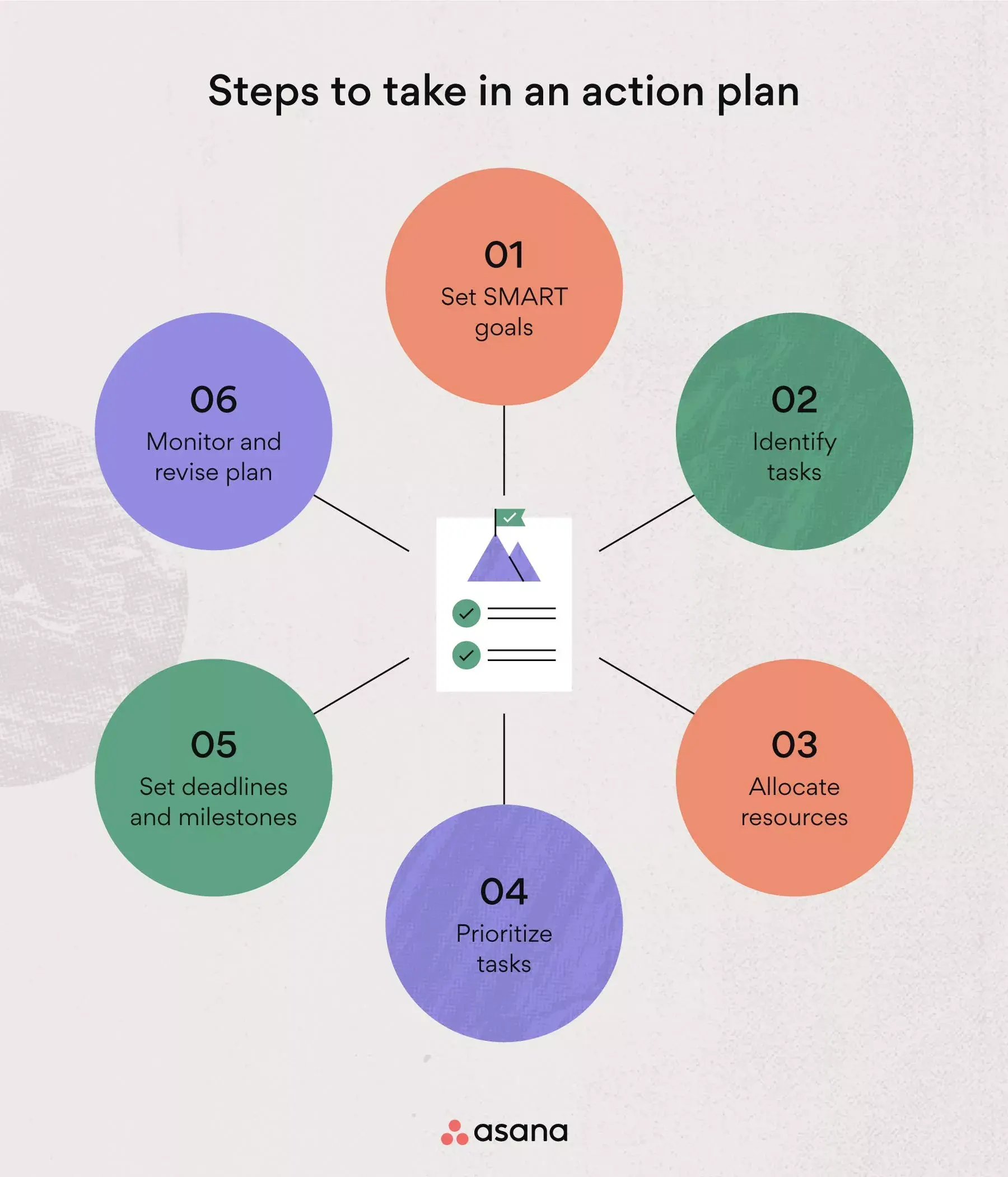
Step 1: Set a SMART goal
When it comes to setting goals, clarity is the single most important quality. With the SMART goal method, your goal is clearly defined and attainable. Set specific, measurable, achievable, realistic, and time-bound goals to benefit from this tactic.
![[Ilustracja w tekście] Cele SMART (infografika)](https://assets.asana.biz/transform/bca4c26d-0f4a-4850-b9a3-ff698d140b19/inline-project-management-project-management-phases-2-2x?io=transform:fill,width:2560&format=webp)
For example, your goal could be to deliver your current project (measurable) in four months (time-bound) without overspending (specific). Assuming this goal is both achievable and realistic based on your available resources, it's a great SMART goal to set for yourself.
Przeczytaj: Twórz lepsze cele SMART korzystając z tych wskazówek i przykładówStep 2: Identify tasks
Now that your goal is clearly defined and written down, you'll want to identify the steps you have to take to reach it. Identify all of the tasks that you and your team need to complete to reach milestones and, eventually, the main objective.
Here are a few action plan examples with tasks for different kinds of goals:
Goal: Expand the team from seven to nine team members by June.
Tasks:
Meet with Human Resources to discuss the recruitment campaign.
Create a template project to track candidates.
Schedule three interviews per week.
Goal: Select and onboard new work management software for the entire company by the end of Q2.
Tasks:
Apply for the budget.
Create a roll-out plan for Q2.
Schedule training for team members.
Goal: Host 5k charity run in May to raise $15,000 for the local food bank.
Tasks:
Find volunteers and determine responsibilities
Prepare marketing materials and PR plans
Secure sponsors
Step 3: Allocate resources
Once you've outlined all of your tasks, you can allocate resources like team members, project budget, or necessary equipment. Whether it's assigning team members to certain tasks, applying for a budget, or gathering helpful tools, now is the time to plan and prepare.
Sometimes you can't allocate all your resources before putting your action plan into motion. Perhaps you have to apply for funding first or need executive approval before you can move on with a task. In that case, make the resource an action item in your plan so you can address it later.
Przeczytaj: Czym jest zarządzanie popytem i czy jest Ci potrzebne?Step 4: Prioritize tasks
When your team understands their priorities, they know what work to do first and what to reschedule if necessary. No action plan is set in stone, so the best way to empower your team is to let them know which tasks are high priority and which are a bit more flexible.
To make this clear, sort all of your action items by priority and sequence:
Priority: Important and less important tasks.
Sequence: Order in which tasks have to be completed so others can start.
When you're organizing and prioritizing your action items, you'll notice that some tasks are dependent on others; one can't begin until the previous one is completed. Highlight these dependencies and factor them into your prioritization. This reduces bottlenecks and keeps high-priority work moving.
Przeczytaj: Czym są zależności w zarządzaniu projektamiStep 5: Set deadlines and milestones
When your team knows what they're working towards, they have the context to prioritize effectively and the motivation to do great work. Team members are more engaged when they see how their tasks contribute to larger goals.
To keep everyone aligned, assign deadlines to all action items and define milestones, specific points along your timeline that mark when activities are completed or when a new phase begins.
Create a timeline, milestone chart, or Gantt chart to visualize your tasks, milestones, and deadlines. This serves as a baseline to make sure your team stays on track.
Przeczytaj: Jak wyznaczać, osiągać i świętować osiągnięcie kamieni milowych projektuStep 6: Monitor and revise your action plan
Your ability to stay on top of and adapt to changes is what makes you a great project manager. It's crucial that you monitor your team's progress and revise the plan when necessary. If you ever find recurring issues slowing your team down, a corrective action plan template can help you pinpoint root causes and turn problems into improvements.
Luckily, your action plan isn't set in stone. The best way to track potentially changing priorities or deadlines is to use a flexible tool, such as work management software. That way, you can update to-dos and dependencies in real time, keep your team on the same page, and keep your action plan moving.
You can also use an action log template to keep a running record of what's been completed, what's pending, and any follow-up items from your reviews. Log templates help your team track accountability over time and make data-driven updates to the plan.
[Przeczytaj] Na czym polega technika After Action Review (AAR)?Action plan vs. plan B vs. project plan vs. to-do list
So, how exactly does an action plan differ from all these other plans and lists? Here's a quick comparison:
Type | Purpose | Best for |
|---|---|---|
Action plan | Outlines specific tasks and steps to achieve one goal | Executing a defined objective with your team |
Plan B | Provides an alternative strategy if the original plan fails | Risk management and contingency planning |
Project plan | Defines all elements of a project (scope, budget, stakeholders, timeline) | Complex projects requiring detailed coordination |
To-do list | Lists individual tasks without a unifying goal | Daily task management and personal organization |
Let's break down each of these in more detail.
Action plan vs. plan B
You may have heard the terms "action plan" and "plan B" used interchangeably. But in fact, an action plan and plan B are two completely different types of plans. Here's how to tell them apart:
Your action plan outlines the steps in great detail so you and your team know exactly what to do to reach your goal.
A plan B is a secondary action plan, an alternative strategy, that your team can apply if your original plan fails. Whether that's due to an internal issue or an external factor, having a plan B is a great way to prepare for the worst-case scenario.
Action plan vs. project plan
A project plan is a bit more complicated than an action plan. Project plans are blueprints of the key elements your team needs to achieve your project goals. A project plan includes seven elements:
Goals and project objectives
Stakeholders and roles
Milestones and deliverables
Once you’ve created a project plan, use an action plan to document the steps your team will take to reach its goals. For a more flexible alternative that organizes tasks, owners, deadlines, and milestones without covering every element of a full project plan, try our work plan template. Choose the format that best matches the size and complexity of the work.
Action plan vs. to-do list
A to-do list is typically used to write down single tasks that don't necessarily lead to one common goal. To-do lists can change daily and are much less organized than action plans. An action plan follows specific steps and includes tasks that all lead to a common goal.
How to implement your action plan successfully
Creating an action plan is just the first step; implementing it successfully requires the right tools and approach. Here are five tips to ensure your action plan delivers results:
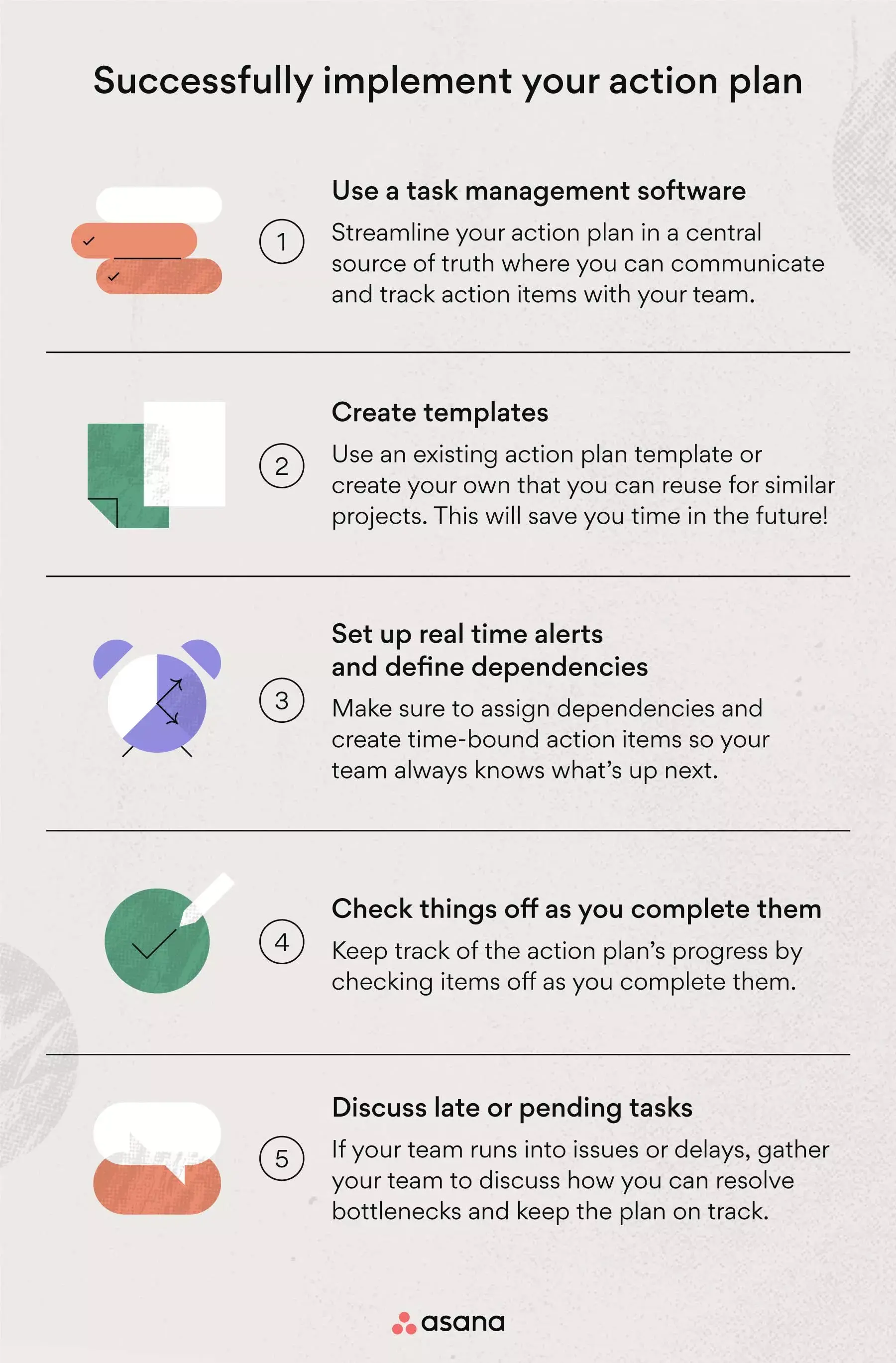
Use task management software
Streamline your action plan by keeping all of your tasks and timelines in one central source of truth. Task management software, like Asana, is perfect for your action plan because it lets you track pending tasks, assign ownership, set dependencies, and connect with your team in real time or asynchronously.
Use or create templates
Create or use a template that lists all the action items with notes, status, priority, and ownership. When you create a template that fits your project type, you can reuse it time and time again.
Set up real-time alerts and assign dependencies
Make sure all action items are time-bound and that you assign dependencies. That way, your team can react when an item is ready for them and easily track what other items depend on theirs.
Check action items off as you complete them
When action items are completed, check them off. Make sure it's visible to everyone and happens in real time so the person responsible for the next action item can start their work as soon as possible.
[Przeczytaj] Czym są wąskie gardła w zarządzaniu projektami? 3 sposoby na ich identyfikacjęDiscuss late or pending tasks
If you run into issues or delays, talk to your team to uncover potential bottlenecks and find solutions that keep the action plan on track. You can add notes directly into your action plan or set up calls to discuss more complex issues.
Turn your goals into action
Like Benjamin Franklin once said: "If you fail to plan, you are planning to fail." Creating an action plan helps you stay focused and on track, bringing your goals to life.
Plan to succeed with a structured action plan and helpful tools like Asana's task management software. Connect and align with your team in a central source of truth while staying flexible enough to revise your action plan when necessary. Ready to move from planning to doing? Get started with Asana today.
Frequently asked questions about action plans
An effective action plan includes a well-defined goal (like a SMART goal), a list of specific tasks needed to achieve it, assigned owners for each task, clear deadlines, and a method for tracking progress.
A strategic plan defines what your organization wants to achieve long-term, while an action plan defines how you'll achieve it through specific, short-term tasks.
Absolutely, action plans work well for personal development, career goals, or any project where setting clear steps and deadlines helps you stay organized and motivated.
Review your action plan weekly for fast-moving projects or monthly for longer initiatives, and update it whenever priorities shift or deadlines change.