


Agentic Work Management
Power every team with AI
Personal
For one or two people managing personal projects.
Free forever
Manage tasks and personal to-dos:
2 users
Unlimited tasks and projects
Never run out of space for work. Create as many tasks and projects as you need to track to‑dos and tie them to higher‑level goals.List, board, and calendar views
See work the way you need – flip between lists for details, boards for flow, or calendars for deadlines without losing context.Unlimited storage, 100MB max per file
Keep all your documents in one place. Upload as many files as you need (up to 100 MB each) so your team never has to hunt for content.Status updates
Keep everyone aligned. Post concise updates on what’s been accomplished and what’s ahead so teams stay focused.Time tracking with integrations
Know how long work really takes. By syncing with your time‑tracking tools, Asana shows actual effort so you can plan budgets and schedules confidently.100+ free integrations
Use your favorite tools without friction. Integrate Asana with Slack, Google Drive, Zoom and 100+ apps to centralize conversations and files.
Starter
For small teams and professionals that need to track their projects progress and hit deadlines.
Per user, per month billed annually
Asana AI included:
AI Teammates and Asana Dash
Includes 5 requests per user per month, up to 50 requests per accountAI Studio
Includes 50K credits per billing account per monthEverything in Personal, plus:
No user seat limits
Timeline and Gantt views
Plan projects with confidence. Visualize schedules on a timeline and dive into task dependencies and progress with interactive Gantt charts.Reporting dashboards
See the big picture at a glance. Dashboards turn project data into charts and metrics so you instantly know if you’re on track.Unlimited automations
Let routine work run itself as many times as you need to. Create automations to assign work, send alerts and keep statuses current.Forms
Get all the info you need. Intake forms capture requests and details and automatically create tasks, so nothing gets lost.Custom templates
Standardize how work starts. Create templates that mirror your best practices so every new project kicks off quickly and consistently.Custom fields
Capture the data your team needs. Custom fields let you tag tasks with priorities, budgets and statuses so reporting reflects reality.Unlimited free guests
Bring partners into the loop. Unlimited free guest seats let clients and contractors collaborate without increasing your license count.
Advanced
For growing teams that turn goals into actionable projects, plan team capacity, and keep decisions moving.
Per user, per month billed annually
Asana AI included:
AI Teammates and Asana Dash
Includes 5 requests per user per month, up to 50 requests per accountAI Studio
Includes 75K credits ber billing account per monthEverything in Starter, plus:
Unlimited portfolios
See the forest, not just the trees. Portfolios let you organize related projects and track overall health from one place.Goals
Make strategy tangible. Goals connect your team’s daily tasks to higher‑level objectives so everyone sees progress toward what matters most.Resource management
Identify who's overloaded, who has capacity, and rebalance work instantly, within one portfolioApprovals and proofing
Keep work moving. Annotate PDFs and images, request approvals, and know exactly when a deliverable is ready to launch.Forms branching & customization
Capture only what matters. Dynamic forms adjust questions based on answers, ensuring you gather complete details without overwhelming your submitters.Time tracking
Stop guessing. Compare estimated and actual time spent so you can forecast staffing and budgets more accurately.Scaled security
Trust that your data is safe. Asana’s security controls protect sensitive information and provide granular access policies across teams and contractors.Connect Salesforce, Tableau, PowerBI Support
Stop switching between tools to piece together the full picture. Connect Salesforce, Tableau, and Power BI to your project data and get unified reporting across every workstream.
Enterprise
For organizations that scale work across departments with security built in.
Contact sales for pricing
Asana AI included:
AI Teammates and Asana Dash
Includes 5 requests per user per month, up to 250 requests per accountAI Studio
Includes 200K credits ber billing account per monthEverything in Advanced, plus:
SAML authentication
One set of credentials for everything. Use SAML‑based SSO so employees sign in through your identity provider and IT stays in control.User provisioning (SCIM)
Make onboarding and off‑boarding effortless. SCIM automatically creates accounts for new hires and revokes access when they leave, protecting data without manual work.Universal resource management
Get a bird’s‑eye view of capacity. Organization‑wide workload reveals who’s overbooked or free across all work so you can reassign tasks and prevent burnout.Capacity planning
Protect your people and your timelines. Capacity planning highlights when teams are at risk of overload so you can shift work and keep projects on schedule.Service accounts
Automate safely. Service accounts give integrations their own credentials for bulk data access, keeping personal accounts secure.View-only licenses
Include everyone who needs to know. View‑only licenses let stakeholders see progress without increasing seat costs or risking unwanted edits.Guest invitation permissions
Protect your workspace’s boundaries. Decide who’s allowed to invite outside collaborators so only trusted members extend access.Project admin controls
Empower without losing control. Delegated project administration lets team leads manage settings on their own projects while central settings stay locked down.Enterprise+ available for advanced security and compliance
For the highest security and compliance needs, Enterprise+ adds SIEM integration, data residency, audit logs and dedicated workspaces.
Personal
For one or two people managing personal projects.
Free forever
Manage tasks and personal to-dos:
2 users
Unlimited tasks and projects
Never run out of space for work. Create as many tasks and projects as you need to track to‑dos and tie them to higher‑level goals.List, board, and calendar views
See work the way you need – flip between lists for details, boards for flow, or calendars for deadlines without losing context.Unlimited storage, 100MB max per file
Keep all your documents in one place. Upload as many files as you need (up to 100 MB each) so your team never has to hunt for content.Status updates
Keep everyone aligned. Post concise updates on what’s been accomplished and what’s ahead so teams stay focused.Time tracking with integrations
Know how long work really takes. By syncing with your time‑tracking tools, Asana shows actual effort so you can plan budgets and schedules confidently.100+ free integrations
Use your favorite tools without friction. Integrate Asana with Slack, Google Drive, Zoom and 100+ apps to centralize conversations and files.
Starter
For small teams and professionals that need to track their projects progress and hit deadlines.
Per user, per month billed annually. $13.49 billed monthly
Asana AI included:
AI Teammates and Asana Dash
Includes 5 requests per user per month, up to 50 requests per accountAI Studio
Includes 50K credits per billing account per monthEverything in Personal, plus:
No user seat limits
Timeline and Gantt views
Plan projects with confidence. Visualize schedules on a timeline and dive into task dependencies and progress with interactive Gantt charts.Reporting dashboards
See the big picture at a glance. Dashboards turn project data into charts and metrics so you instantly know if you’re on track.Unlimited automations
Let routine work run itself as many times as you need to. Create automations to assign work, send alerts and keep statuses current.Forms
Get all the info you need. Intake forms capture requests and details and automatically create tasks, so nothing gets lost.Custom templates
Standardize how work starts. Create templates that mirror your best practices so every new project kicks off quickly and consistently.Custom fields
Capture the data your team needs. Custom fields let you tag tasks with priorities, budgets and statuses so reporting reflects reality.Unlimited free guests
Bring partners into the loop. Unlimited free guest seats let clients and contractors collaborate without increasing your license count.
Advanced
For growing teams that turn goals into actionable projects, plan team capacity, and keep decisions moving.
Per user, per month billed annually. $30.49 billed monthly
Asana AI included:
AI Teammates and Asana Dash
Includes 5 requests per user per month, up to 50 requests per accountAI Studio
Includes 75K credits ber billing account per monthEverything in Starter, plus:
Unlimited portfolios
See the forest, not just the trees. Portfolios let you organize related projects and track overall health from one place.Goals
Make strategy tangible. Goals connect your team’s daily tasks to higher‑level objectives so everyone sees progress toward what matters most.Resource management
Identify who's overloaded, who has capacity, and rebalance work instantly, within one portfolioApprovals and proofing
Keep work moving. Annotate PDFs and images, request approvals, and know exactly when a deliverable is ready to launch.Forms branching & customization
Capture only what matters. Dynamic forms adjust questions based on answers, ensuring you gather complete details without overwhelming your submitters.Time tracking
Stop guessing. Compare estimated and actual time spent so you can forecast staffing and budgets more accurately.Scaled security
Trust that your data is safe. Asana’s security controls protect sensitive information and provide granular access policies across teams and contractors.Connect Salesforce, Tableau, PowerBI Support
Stop switching between tools to piece together the full picture. Connect Salesforce, Tableau, and Power BI to your project data and get unified reporting across every workstream.
Enterprise
For organizations that scale work across departments with security built in.
Contact sales for custom pricing for your organization
Asana AI included:
AI Teammates and Asana Dash
Includes 5 requests per user per month, up to 250 requests per accountAI Studio
Includes 200K credits ber billing account per monthEverything in Advanced, plus:
SAML authentication
One set of credentials for everything. Use SAML‑based SSO so employees sign in through your identity provider and IT stays in control.User provisioning (SCIM)
Make onboarding and off‑boarding effortless. SCIM automatically creates accounts for new hires and revokes access when they leave, protecting data without manual work.Universal resource management
Get a bird’s‑eye view of capacity. Organization‑wide workload reveals who’s overbooked or free across all work so you can reassign tasks and prevent burnout.Capacity planning
Protect your people and your timelines. Capacity planning highlights when teams are at risk of overload so you can shift work and keep projects on schedule.Service accounts
Automate safely. Service accounts give integrations their own credentials for bulk data access, keeping personal accounts secure.View-only licenses
Include everyone who needs to know. View‑only licenses let stakeholders see progress without increasing seat costs or risking unwanted edits.Guest invitation permissions
Protect your workspace’s boundaries. Decide who’s allowed to invite outside collaborators so only trusted members extend access.Project admin controls
Empower without losing control. Delegated project administration lets team leads manage settings on their own projects while central settings stay locked down.Enterprise+ available for advanced security and compliance
For the highest security and compliance needs, Enterprise+ adds SIEM integration, data residency, audit logs and dedicated workspaces.
Unlimited tasks
Unlimited projects
Unlimited comments
Unlimited storage, 100MB per file
Unlimited messages
Activity logs
iOS and Android mobile apps
Recurring tasks
Multi-select and bulk actions
Multi-home tasks to projects
AI Teammates and Asana Dash
AI Studio (with additional credits for purchase)
AI Assists
Project overview
List
Board
Calendar
My tasks
Notes
Timeline
Gantt
Goals
Portfolios
100+ free integrations, including Microsoft 365, Google Workspace, Slack, and other everyday apps
Forms
Start dates and times
Task dependencies
Workflow builder
Custom field management dashboard
Reference custom fields
Project template management dashboard
Custom templates
Custom task types
Unlimited rules
Forms with branching logic
Critical path
Proofing
Approvals
Integration with Jira Cloud (two-way sync)
Workflow bundles
Script actions
Goals (company, team, and individual levels)
Goal strategy map
Automatic goal progress
Weighted goals
Reporting on goals
Saved grid views
Goal templates and goal types (objectives, key results)
CSV and PDF export
Status updates
Custom fields
Reference custom fields
Project dashboards
Charts customization
Charts template library
Advanced search
Milestones
Universal reporting
Formulas
Integrations with Salesforce, Tableau, and Power BI
Portfolio dashboards
Portfolio summary report (PDF export)
PowerPoint export (portfolios, dashboards)
Timesheets
User rates
Project budgets
Time tracking
Portfolio resource management
Universal resource management
Capacity planning
Placeholder profiles
SOC 2 Type II
Multi-factor authentication
256-bit encryption at rest and in-transit
Cross regional backups
Data deletion
Google SSO
Microsoft SSO
SAML
Read-only link management
Audit Log API (built to support SIEM)
SIEM integration (Splunk)
eDiscovery integration (Exterro, Hanzo)
Data Loss Prevention (DLP) integration (Netskope)
Archiving integration (Theta Lake)
Organization exports
Managed workspaces
IP allowlisting
Enterprise Key Management, subject to eligibility
HIPAA compliance available, see requirements
User limit
Access controls
Private teams
Private projects
Unlimited free guests
Admin console
Comment-only projects
Team sharing on projects
Pause a member’s license
App management
Lock custom fields
Custom branding
Custom onboarding
Admin announcements
User and group provisioning and deprovisioning (SCIM)
Guest invite permissions
Project controls via project admin
Team membership controls via team admin
Service accounts
View-only licensing
Automatic guest removal
Allow guests to be invited from a trusted domain
Mobile app controls
Video recording management
Form access for domains
Disable file attachments
Custom role-based access controls
Advanced permissions
Sandboxes
Multi-org deployment
Asana Forum
Asana Academy
Asana webinars
Asana Help Center
Asana Developer Guide
Asana Support (direct)
Customer Success options
24/7 support
99.9% uptime SLA
Weekend support for complex data migrations

AI for every workflow

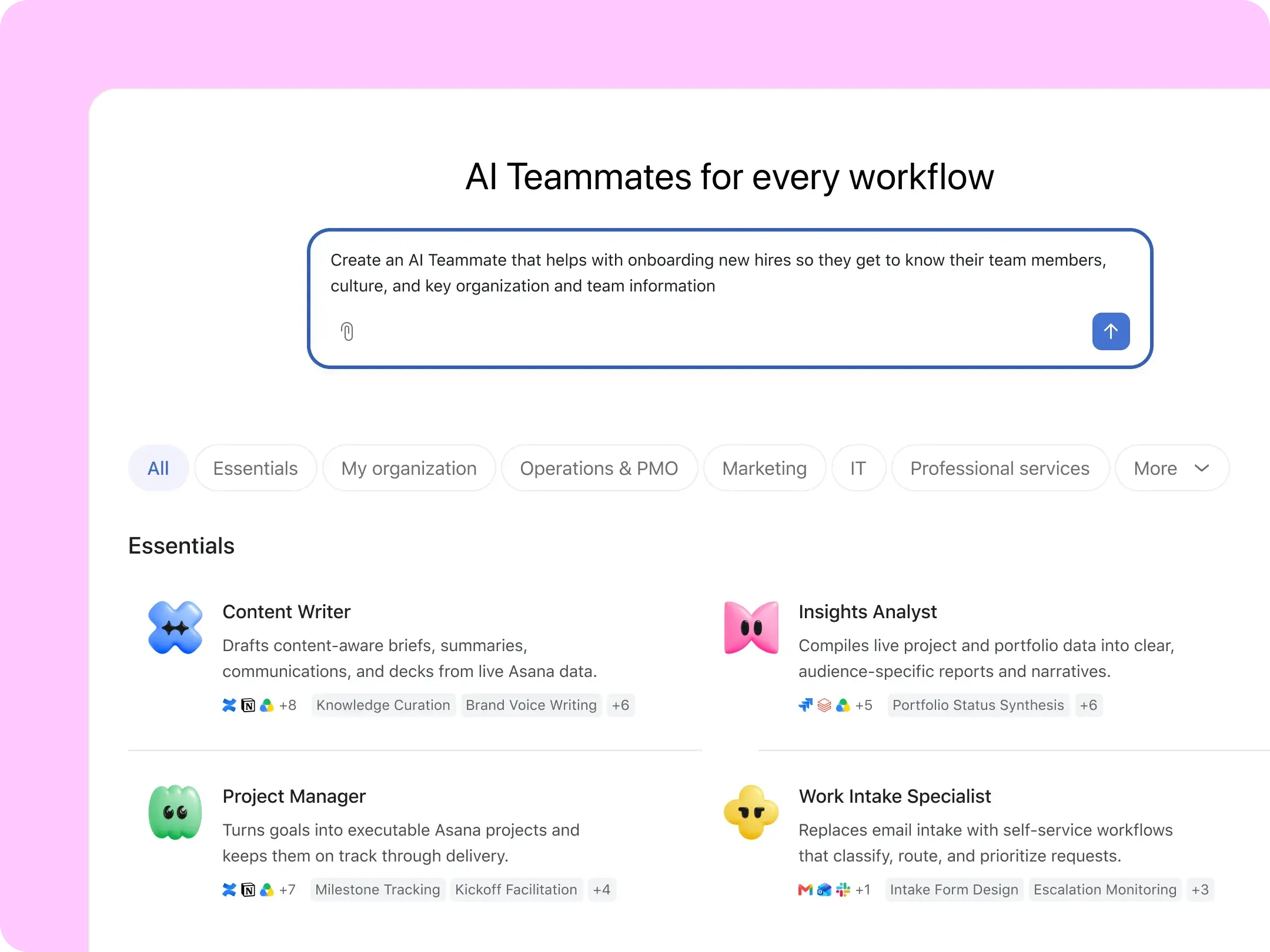

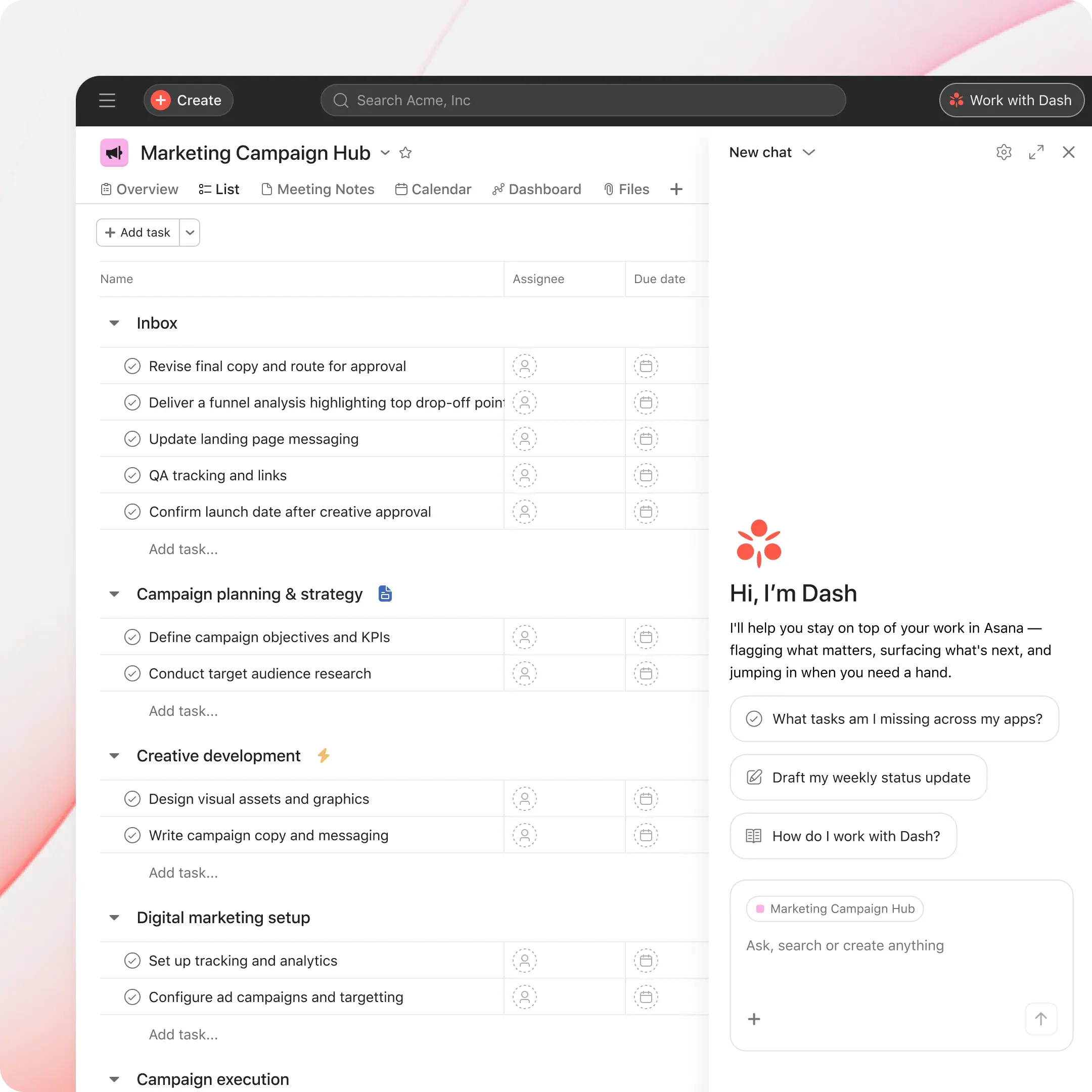
Ready-to-go AI Teammates supercharge your team
30+ ready-to-go AI Teammates
AI that shows up where work happens
AI that gets smarter with every workflow
Enterprise-grade governance built in
One flat rate for every AI request
Pre-paid AI requests are $0.50 per request
No rate cards, no surprises
Every AI request is charged at the published rate—no credit tables to decode.
Administrative tasks are included
Administrative tasks with Asana Dash, like prioritizing your day or analyzing data in your Work Graph®, are included at no extra cost.
Flexible AI usage
Annual customers can use AI requests anytime during their contract term. Pay as you go for exact usage, or prepay upfront for a discount.
Buy AI usage packs or pay as you go
Usage packs
Give your team the capacity they need to accomplish more. Prepaid AI requests are yours for your full contract terms with no monthly resets.
Available on Starter, Advanced, Enterprise, and Enterprise+ plans
$0.50 per AI request, billed upfront
Buy as many packs as your team needs
Live usage dashboard for visibility and control
Yours for your full contract team, no monthly resets
Pay as you go
Pay as you go for exact usage with on demand billing. No upfront commitment required, billed monthly.
$5.99 per user, per month billed annually. Available on Starter, Advanced, Enterprise, and Enterprise+ plans
$0.60 per AI request, billed monthly
Set a monthly spend cap
Manage on demand billing directly in-product
Live usage dashboard for visibility and control
ADD-ONS
Extend Asana with optional modules
Add only what your team needs - billed separately on eligible plans
Timesheets and Budgets
Improve project outcomes with real-time visibility into budgets, time, and costs—all in one place.
Available as an add-on to Starter, Advanced or Enterprise plans.
Track progress with accurate timesheet data
Monitor project health with budget tracking
Manage resources with flexible rate cards
Compliance management
Give your legal, IT, and security teams the tools they need to stay compliant and reduce risk.
Available as an add-on to Enterprise plan.
Track activity with detailed audit logs
Enforce security policies at the network level
Preserve and export data for compliance needs
Permissions management
Let admins and IT easily manage user permissions, app usage, and mobile and guest access all in one secure place.
Available as an add-on to Enterprise plan.
Define roles that match your org structure
Control access across apps, guests, and devices
Enforce content-sharing policies with precision
Loved by 100,000+ organizations across the globe














Deliver real productivity for every team
Learn more about the pricing details of Asana's products

Asana Client Management
Build lasting client relationships on an AI-Native platform built for agency work

Asana Service Management
One AI-native enterprise service level management platform for IT, HR, facilities, and legal.
Frequently asked questions
An AI request is one successful unit of work executed by AI Teammates or Asana Dash, which share a single pool of AI requests. Administrative tasks in Dash are included at no extra cost. You're only charged when work gets done; failed, timed-out, or canceled tasks don't count. For Dash, AI requests only count when Dash completes complex work (e.g., integrations, web search, long-form content generation) or hands off the work to an AI Teammate.
Paid usage packs are valid for your entire billing cycle. For monthly customers: packs expire at month's end. For annual customers: packs can be used anytime across your contract term with no monthly resets. On-demand, pay-as-you-go billing is also available, billed monthly for exactly what you used with no upfront commitment.
You have two options. Prepaid usage packs at $0.50 per request, valid for your full billing cycle. On-demand, pay-as-you-go billing at $0.60 per request, billed monthly in arrears.
Your admin console shows a live dashboard of requests consumed, remaining balance, and usage by user and AI Teammate. Alerts fire at 65%, 85%, and 100% of your allotment. Admins can set a spending cap on on-demand billing and toggle AI request access per user at any time.
You can cancel at any time, and if you cancel before your next renewal, you'll retain access to paid features through the end of your current subscription period. To cancel your paid plan, log in to your Asana account and access your admin console.
Asana offers flexible subscription options based on the features you need and the size of your team. For smaller teams, we have plans designed for 2 members.
AI Studio is available on Starter, Advanced, Enterprise, and Enterprise+ plans. AI Studio is available in three options:
AI Studio Basic: Included access to AI Studio to explore how AI can help take on routine, manual work (includes rate limits).
AI Studio Plus: Paid access to AI Studio to level up productivity for individuals and small teams (available on monthly & annual plans).
AI Studio Pro: Paid access to AI Studio to scale complex workflows and business operations with advanced billing controls (available on an annual plan).
To get started, ensure your admin has Asana AI enabled. From there, all members of your domain will be able to build smart workflows. Learn more here.
You can grow your team by adding seats in increments as follows:
Between 2 and 5 total users: add seats in increments of 1
Up to 30 total users: add seats in increments of 5
Up to 100 total users: add seats in increments of 10
Up to 500 total users: add seats in increments of 25
More than 500 users: add seats in increments of 50
Asana is committed to protecting customer data. We build our platform using best practices for highly available, scalable, and secure cloud applications. We regularly monitor and assess our program to ensure that it meets or exceeds compliance and regulatory requirements. Please visit our Trust Center for more information.
We’re happy to work with student groups using Asana. Contact us.
If you need administrators and premium package features for all teams, upgrade your entire organization. If you don't need administrators or premium features for all teams, but want to add more guests, set per-project permissions, or hide a team, you can upgrade an individual team. Learn more.
Yes. We will apply state and local sales tax based on your billing address to your total charge.
We are passionate about the web and do not plan to offer an internally hosted version of Asana.
Asana is committed to protecting and honoring your global privacy rights as well as securing the data you provide to us through the use of our products. For more information and details about our privacy and security programs, please visit our Trust Center.
The Asana subscription service is hosted on dedicated servers within secure, industry-leading data centers provided by Amazon Web Services. These data centers have achieved and maintain SOC 2 compliance and provide 24-hour physical security including biometric access controls and continuous surveillance.
Asana may be required to charge VAT, GST, and other taxes on your subscription in accordance with local laws and regulations. Some jurisdictions do not require VAT/GST to be charged if the purchaser is registered for VAT/GST. If you are registered for VAT or GST purposes, please add your VAT/GST registration number during the checkout process to have your exemption processed. For more information, please visit our Asana VAT Help page.
Asana is happy to offer eligible nonprofit organizations a discount on an Asana Starter or Asana Advanced annual plan. You can learn about the Asana nonprofit discount here.
We do not offer refunds. If you cancel your plan before the next renewal cycle, you will retain access to paid features until the end of your subscription period. When your subscription expires, you will lose access to paid features and all data associated with those features.