Increase AI value for IT with smarter integration
Join one of Asana's strategic partners, Unito, as they share innovative approaches to work management and organizational efficiency. See how Asana and Unito's no-code sync platform eliminates manual workflows, connects your entire stack in real time, and delivers measurable ROI. This session explores real-world use cases, best practices, and actionable strategies to improve team productivity.
3:16 – Milwaukee Tool Integration Case Study
7:26 – ServiceNow and Asana Employee Onboarding
10:48 – Asana Tables and Database Syncing
12:59 – Marketing and Web Development Workflow
16:22 – HubSpot No Code Implementation Success
Hi, everyone. I'm Kirk Miles. I lead Agentic work management at Asana. One of the things, hopefully, you all know is that Asana has, over the years, has built a number of native integrations.
But with our partnership with Unido, we're taking that to the next level and enriching context at enterprise scale.
And...
Sorry. And, ultimately, what that enables is for your teams of humans and agents to better understand the work happening across all... Your entire company.
And when you're able to, to transport structured data across your different tools and systems of records, it unlocks a variety of new cases.
So to take us to dive in and share more about what makes that all possible, I'm really excited to introduce Marc Boucher Boucher, the CEO and founder of Unito, to talk us through his product.
Thanks, Kir.
Thank you.
Happy to be here.
And speaking for Unito, we're heavy users of Asana ourselves and have been solving problems for Asana customers for for some years. So I'll be... Obviously excited about the partnership, especially because these kind of partnerships, they... They're really win win. They're a win for Asana, for Unito, but especially for customers because you get a one stop shop for a really fully integrated solution. And I do mean a one stop shop because thrilled to share that the Unido Sync add on is now part of Asana's enterprise offering and available all from one vendor, all from Asana.
Now partnerships like these, they get announced all the time. What really matters is what kind of value it's gonna unlock for you and your teams. And so let's dive in. Let me show you firsthand.
Thanks, Kirk. I'll take it from here. Perfect. Thanks, Mark. Thank you.
So quick context.
Unino is an integration platform, but it's designed very differently than most solutions on the market.
As we share first, we're designed for enterprise customers and requirements.
But second, what we're probably most known for in the market is two way data sync, true two way two way data synchronization. So if you're in Asana, talking about projects, tasks, or comments, all these things are gonna keep in sync across your different systems. So you never have two systems in your org that are giving you two different versions of the truth.
And that two way sync, we do it out of the box. So if you've ever tried to build a two way integration with a more, let's say, traditional if this, then that types of automations, you'll know how that quickly gets out of hand.
And the last point is that Unido is a fully no code solution. And if you've ever built a rule inside of Asana, then you'll be able to build a sync inside of Unido.
And you should really think of Unido as a complete platform. We can sync over 60 tools off the shelf with Asana or amongst themselves, and we can add connectors on demand. So if you've got an on prem app or some kind of legacy system in your company or any of these new apps that are being, I guess, vibe coded while we sleep, these can all be integrated and synced into Asana as well.
So on that, let me share a little customer story here. This is Daniel. He's a senior principal engineer at Milwaukee Tool. And, his team's designed the circuits that go inside of all those nifty little power tools we see at a construction site.
Now at Milwaukee Tool, they manage all of their schedules, the project schedules inside of Asana, but the engineering teams all work out of Azure DevOps. And how they keep those two systems in step? Well, Daniel and his team manually. Right?
As he says, people just tend to go through the tool that they work in and they leave the other ones behind. And you know what happens if the project plan in Asana is out of date? People stop planning out of Asana. Now based on these problems, most customers will actually go to their IT department.
And they'll put in a request into the infamous IT backlog. Right? And these backlogs are brimming, are full of integration requests these days. If your IT here in the room, this will look familiar.
It's basically a Tuesday morning. And this makes sense because we're using so many different tools. Right? So just quick, show of hands.
Who here has ever made an integration request or received an integration request at work?
Alright. Now you can lower your hand. Now I'm gonna ask you to raise it again if that integration request was solved really, really fast, like in a matter of days. Okay.
That checks out. Oh, two of them. Okay. So a lot of people, a lot of requests, and almost a 100% of them that work in the same team take way too much time to get solved.
And that makes sense because most integration solutions are either point solutions that just solve one thing, or they're these sprawling, overly complex platforms that require a technical team to deploy anything or to change anything.
And what happens when you don't resolve those integration requests? Right?
Duplicate work, extra meetings just to get on the same page, people stop making requests to IT, people go around IT. And so integration's basically, bottom line, expensive to solve and expensive to not solve.
And that makes sense because, as we all know, humans need context to work. And while Asana might be the heart of where your teams are planning and collaborating, a lot of the work happens in tools around Asana. So sales, working out of Salesforce, technical customer support out of Zendesk, IT requests and ServiceNow, or engineering inside of Jira or Azure DevOps, like Milwaukee tools. And the context inside of those tools is absolutely critical to the people that are using it. So the tools aren't going anywhere.
And in this age of era, this is becoming even more true because guess what? You've heard it. AI also needs context to do its work. So again, IT folks here expect even more of those requests to fill your backlog as you deploy more and more integrations, more and more AI inside of your company.
Now you've heard Asana talk about a lot of their AI teammates and AI capabilities and how those are rooted and draw upon the Asana work graph. And that work graph is basically the collection of all the action items and collaborators and all the relationships amongst them in your org. And the work graph is what really makes all of those AI capabilities actually work. Right? They're grounded in the realities of your business.
But the work graph can only see what you've actually put in it. Right? It can only act on the things you've connected to it. And so the 70% of the work happening in your business that is outside of Asana, it is invisible to the work graph.
And so it's invisible to the AI teammates and all those AI features that you're putting on top of it. So really, the question that we're gonna be asking today is not how do we consolidate everything on a single tool. It's gonna be how do we wire up as much of our business context inside of the Asana work graph. K?
And I'm gonna answer this, this question by showing you two examples, two scenarios in real life to make this really concrete.
The first one is your internal service desk. This is the intake queue that every IT department's managing.
And if you're a large organization, there's pretty good chances that you're using ServiceNow to manage that intake queue, that single portal for all of your requests in organization. And not just, my laptop's broken, but a lot of organizations will send vendor onboardings, legal reviews, even marketing collateral collateral requests through this single portal here.
And all these requests are gonna go through the the portal. Some of them are gonna be resolved directly at the desk, and others will need to be routed to teams that live in Asana, for example. Right? And when work crosses the boundary of tools, that's when the manual work typically comes in.
It feels like throwing something over the wall. You might have had that feeling before where the requester kinda loses any visibility on what's on the other side, and the fulfilling team has no idea what's actually coming their way. Right? We're we're basically flying blind.
So here's a quote from one of our customers that I really like. It might sound familiar.
One poor person responsible for manually triaging and dispatching all the tasks.
Now who here has ever been that person at work before?
So a few shy people. No. Quite a few people. I know I have and, I don't really miss it.
I don't know about you. But let me show you what it looks like when ServiceNow is integrated with Asana with a two way sync. This is a classic, employee onboarding request. I'm requesting Sarah Chen to be onboarded from a ServiceNow portal and wanna submit that.
And because we have a sync set up, what's gonna happen is it's gonna create a project inside of Asana that matches with that request, and it's gonna fill that project with all of HR's standard onboarding template here.
Now, this part, this automation could have been done with many different approaches, including an AI agent with MCP, if you're using those. But what we've got here is a persistent two way sync.
So as the teams start picking up on those tasks on onboarding and maybe they ask some questions, attach a contract, all of that information is actually gonna flow back into ServiceNow. So this is the magic back in ServiceNow where the requester actually has full visibility in all of the tasks of the onboarding live as you progress through the onboarding here.
So there's no more wall here. Well, we've got two teams collaborating from their tool as if everyone was in the same one, and they have full visibility. And there's there's no AI involved here. This is solving a problem that we... That a lot of companies have today with technology.
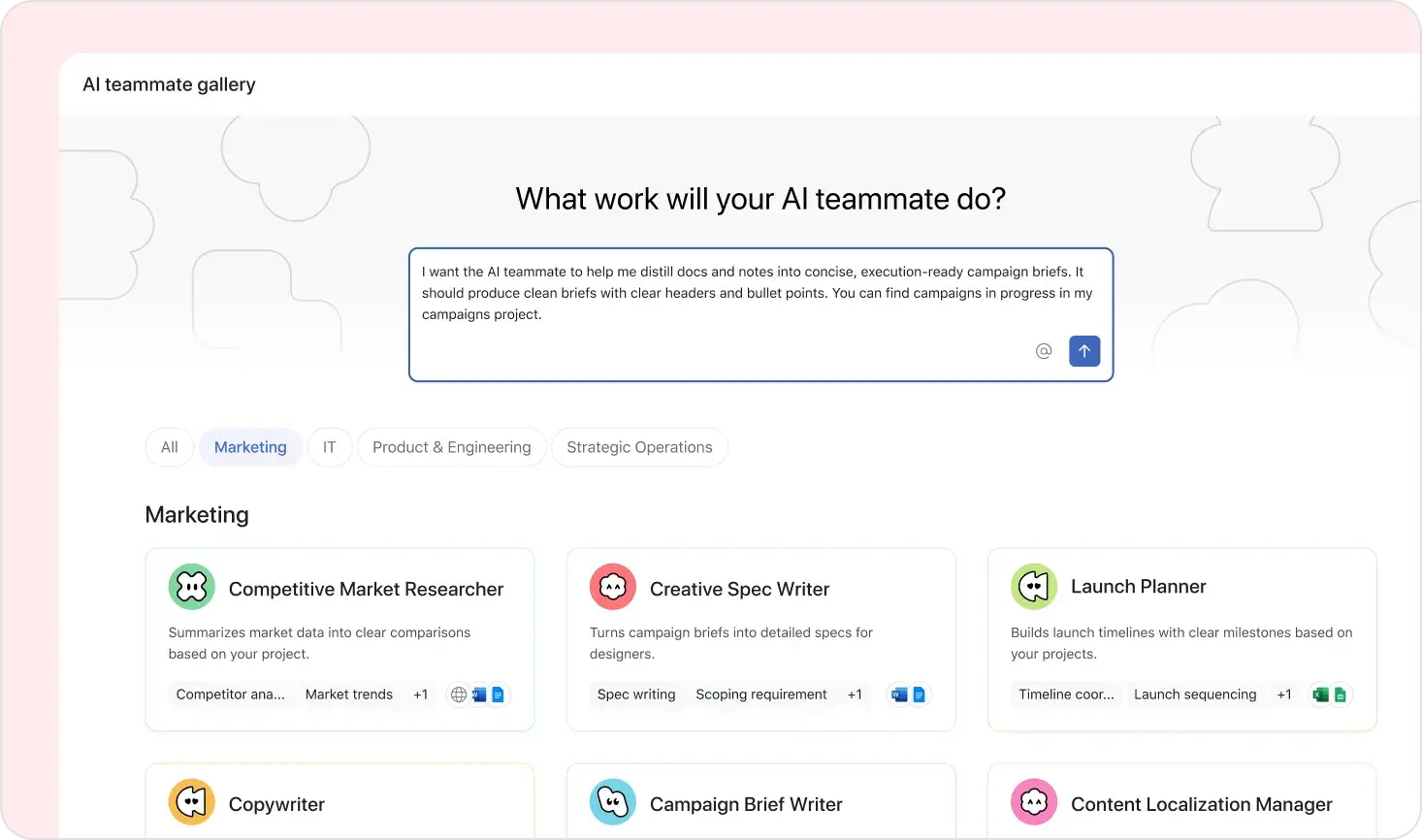
But the next layer of value comes when you start layering AI on top of those. So I'm going to add an AI teammate in Asana, an employee success agent that's going to create a personalized onboarding plan for Sarah here, separate from the HR onboarding plan. And it's going to use the context from the ServiceNow request, and it's going to also look in the Asana work graph at Sarah's team. What are they actually working on right now?
What's on the roadmap? Who's doing what? And it's going to use that to create that personalized onboarding plan so that when Sarah starts, she's ready to go, and it's actually concretely anchored into the real life, of her team. Now this is the compounding effect that I wanna share with you.
Integrations here brings the context over, and then AI can personalize much better because it has that context on hand.
Alright. Before I wrap this section, I wanna talk about this new feature that Asana has been launching.
They shared a little bit about it at the keynote this morning. This is extremely exciting to me because it adds a lot of extensibility and a lot of power to the Asana work graph. It's called Asana tables and you should think of it as a mini database that lives directly in Asana and is wired into the work graph. It's for anything that doesn't look like an action item. So you could think of a product catalog, an inventory, what's a account list of customers, for example, very popular.
And it's all wired into the graph. So it... And it unlocks a lot of capabilities. So let me show you a little bit more in-depth here. So in this screenshot, I'm showing you a list of equipment, computer equipment, and who it's actually assigned to right now in the organization. K?
Now, happy to share that as part of the partnership, we already support syncing tables inside of Asana. So here, what I've got is that asset list syncing between ServiceNow and Asana. So you can, for example, reassign equipment from either of the tools and they will always stay in sync. So I could have initially just exported the list of assets from ServiceNow to CSV and then reimported it back into the table, but these things change all the time. It would have been out of date immediately.
Now you're able to bring this external system of record out of ServiceNow directly into Asana. And if we look at the use case we had earlier where we were onboarding Sarah, one of the tasks in there was ordering a new laptop. Right? And now that task is actually linking to the actual laptop that was fulfilled for Sarah.
Where it is? Which floor? What's the serial number? And if there was a last minute swap IT because the laptop didn't work, then whenever she comes in, she'll have actually the last version, the actual laptop that she should get because it's kept in sync.
And this is for an example with ServiceNow, but all of a... You need those connectors or support with tables. So you could be syncing NetSuite, Airtable, Salesforce, all of that direct... The systems record directly into the Asana WorkRef.
So very excited about this capability.
But let's talk about another scenario here. This was a service desk scenario, and I'm gonna talk a bit about a marketing scenario, is pretty common at Asana. And this is a marketer preparing a q three campaign, right, as marketers do. And as part of that campaign, this marketer needs a new landing page on the website.
And I guess the the clapping isn't in the earphones here. So that request, that campaign is gonna need a new landing page and enterprise organizations have dedicated web teams. So our marketer is gonna have to work with a web developer. And without integrations, you've probably seen this a bunch of times, there's a Slack message that goes out, there's a brief attached to the Slack message, then there's a meeting to put everybody on the same page, make sure they understood it.
Then somewhere someone creates a Jira issue for that landing page, and the marketer kinda loses track of everything that's happening from there. Now, this is what it looks like once the two systems are integrated, Asana and Jira. So now the marketer can actually create the landing page task directly in their campaign in their campaign plan here, inside of Asana. And they can flesh out the request, attach design docs into it, maybe in a few AB variants that they wanna test out.
And because it's synced over to Jira, all of that is gonna show up directly inside of Jira with all the information. The marketer never had to log in to Jira. The marketer doesn't even need a license for Jira. Right?
So it just shows up in the web team's backlog. And as soon as a developer is gonna pick it up, start working on it, commenting, maybe they're gonna attach some early screenshots of a early prototype, all that information is reflected in real time inside of Asana and the marketer can answer it, all that here. So again, this is value today, very common scenario. No AI involved here.
But what we've achieved is we have a marketer that has full visibility into progress, and their own campaign.
We have a developer that has full context, And we have a leadership team that can follow a timeline without having to call a status meeting.
But again, I don't know if you noticed, the marketer here put a very realistic date of today on that task. So let's add some... An AI layer here to kind of accelerate this process.
So we're gonna add a teammate in Asana that acts as a product owner that really knows how the web team actually works. So when that marketer created the request, the agent or the AI teammate is gonna flesh out the request. They're gonna add test scenarios, specs, acceptance criteria, everything that the web team defines as what they need for something to get ready to development. So when it does sync over to Asana, it's much richer and it's actually ready for development. You're gonna skip a lot of the back and forth that takes so much time, to actually... Before things get started.
Now imagine instead, in Jira, we also have a Jira coding agent. Now because that task that showed up from Asana into Jira is ready for development, the coding engine can actually start building it right away. Maybe they build a first prototype. Maybe they they bring it up to production for testing already. And maybe we do reach that deadline of today after all because we've got agents on both sides. So again, that's the compounding effect I want you to take away here. The integration enriches context and it makes sure that all systems have the same context so that whatever AI capabilities you're using in all your systems, they have the full picture and they can perform much faster.
So let me talk a little bit about HubSpot here because the use case I just showed you is exactly what they came to us first to solve. And it was a web team working in Jira and the marketing team working out of Asana.
And they started with these combinations of tools, but then they've since added many other tools to the integration stack. They're now syncing beyond Asana and Jira, Google Sheets, Google Calendar, Airtable, and GitHub. They're syncing 20,000 tasks a month, and they're saving over $400,000 a year. But the key point here is if you remember, Unido is a no code platform. So all of the integrations that marketing team needed, they actually built them themselves, and they actually operate it themselves.
So IT keeps the governance of it, but marketing has the implementation and owns the implementation. And that means that they can move that much faster without filling up that infamous IT backlog we talked about.
So let me show you very quickly, a high level, how you set up a flow or an integration inside of Unito, you get a sense of what the marketing team was doing here. If you want a more in-depth view of the product, come see us at our booth in the Expo Hall. Alright? Happy to show you.
So the first step to setting up a sync is to define the structure of the sync. So on the left side here, what you can can see is a part of Asana's work graph. Right? Portfolios, projects, tasks, subtasks.
And on the right, you can see a structure inside of Asana and how we're mapping it onto the Asana work graph here. And it could have been a different mapping. Here I've got epics inside of Jira mapping to projects inside of Asana, but you could have just as well mapped the epic to a task. Right?
And that flexibility is really important. And if you've ever used Asana's native integration for Jira, you know how this can go much, much deeper and it's much more flexible to the way that you work inside of your organization.
Now, once you've set up the structure, the next step is to go a little bit more granular and map the fields inside of here tasks and work items. So you can map just about any fields, custom fields, fields with rich text, attachments, files.
And you can also control the direction of the sync at the field level. So you can define the source of truth at the field level. So here I'm mapping story points to effort, a custom field inside of Asana. And developers would tell you marketers should not be allowed to tell us what's the effort to build this feature.
So in this case, the engineers are keeping control over that while marketing still has visibility into the effort estimates. K? Now it...
I want you to understand that it is as easy to set up as what you're seeing on this screen, which means that business users, nontechnical users, can actually own these integrations and evolve them as their process changes. That's extremely important in enterprise because process change all the time and change management, especially when process changes across teams, is extremely expensive and painful to to to manage. I see a few people nodding. A lot of pain in change management.
So with if with Unito, if one of the teams changed the process, let's say in Asana you add a custom field you wanna track or on the Jira side you add a new step in the development life cycle, you just have to update the mapping and it'll resync retroactively. And the other team didn't see the difference. Right? And so you're much more able to adapt how you work independently while still keeping full coordination and visibility across the teams. And if you're in IT, IT keeps full governance of this. So you control the connection, the accesses, and the auto logs.
So as I wrap, I just wanna leave you with three key takeaways. K. Connecting Asana to other tools will get you more out of Asana. A connected Asana will always beat a standalone Asana.
Second, AI teammates and all these AI features. They're just as good and just as smart as what you put in the work graph. So it's really worth investing in that work graph. You've heard Asana say how they are built to be multiplayer for humans and agents.
You should think of Unido as going from multiplayer to multi team, like connecting all the tools of these other teams around Asana as well. And last, your tech stack is the stack. You shouldn't need to rip and replace systems, to be able to adopt new technology.
And this is extremely important in this time and age when things are moving so fast. You need the agility to be able to adopt new technology with minimal disruption to how you work and minimal change management.
So on that, thank you so much for listening. Again, don't be shy. We're at the booth.
Happy to talk and share some swag as well. Thank you.