AI productivity with Gemini & Google Workspace
Organizations today need to work smarter and faster. Google Workspace with Gemini helps you do both. In this session, we’ll unveil new Asana integrations with Workspace and explore how AI is transforming the way we work.
1:49 – The Era of Agentic Workspace
4:58 – Interactive Data with Sheets Canvas
7:47 – Automated Deal Watchers and Skills
11:05 – Workspace MCP Server and Ecosystem
17:26 – Asana AI Teammates and Workflows
23:33 - Agentic Work Ecosystem Demonstration
Hi, everyone. I'm excited to share how Gemini and Google Workspace can drive your business' productivity. My name is Hallie Martin, and I'm a product marketing manager on Google Workspace.
I'll be sharing some of Google's vision for how teams can reach their full potential with the power of Gemini.
I'll be joined today by Abidar, who will talk about our Workspace ecosystem and how partners like Asana are essential for us to deliver the vision of AI powered teamwork.
And then Alex Edelstein from Asana will join us to talk about the ways Asana and Workspace work together, including Asana's AI teammates. Is anyone in the room here a Workspace user? Can I get a show of hands?
Awesome.
Happy to see so many users here.
Google Workspace has become the world's most popular productivity suite, and today, it's now empowering over 4,000,000,000 monthly active users globally.
But providing the tools for billions of people to connect is only our first step.
Today, we have something new for you, a dynamic system that will make your workflows more productive.
Let's be honest about the reality of work today. Even with the best tools, work still feels incredibly fragmented.
Your best people are stuck in the process of work, toggling between tabs, hunting for a chart in an email, or digging through chat threads for a decision. I'm sure you've all had those moments. You're spending hours stitching together scattered information before you even start work.
Your business can only move as fast as it takes to connect all of the things you see here.
Today, we flip that burden.
Every person in your organization becomes director, commanding a boundless workforce of autonomous AI agents. These agents don't just assist, they partner with you to get work done.
We are entering a new era where you aren't just managing manual tasks, you are managing outcomes.
Welcome to the era of agentic workspace.
And at the heart of this shift is workspace intelligence.
Workspace intelligence is a dynamic system that turns scattered emails, charts, and documents into a company knowledge graph. It understands your active project milestones, your collaborators, and your organizational knowledge, enabling AI to reason and complete goals on your behalf.
We are doing more than just linking your files. We're grounding Gemini and the reality of your day to day business so you can delegate your busy work to AI. That way, you spend more time on the work that moves your business forward.
Let's look at a day in the life of an enterprise organization starting at 9AM during a busy morning commute.
I usually take long subway rides into the office, and I use that time to go through emails and chats I might have gotten overnight. It can be pretty overwhelming.
Well, instead of spending my train ride digging through a mountain of unread emails and chat pings, Gemini tells me what's important right now.
Right inside Google Chat, Gemini pushes a proactive, deeply contextual daily brief. It surfaces the top things needing your attention right now, such as late breaking questions on a project before you even arrive at the office.
That makes me feel pretty prepared right when I walk into work.
And here's something I find myself doing every day, searching everywhere for an old project file, but I don't remember the file name or the date.
With ask Gemini in chat, you can just describe the project in simple natural terms. For example, I can find our new co marketing policy by just describing it in chat.
Workspace intelligence crawls across the enterprise graph, understands the exact intent behind the question, and instantly pulls up the correct file.
It even gives you a quick summary of the document. No hunting, no switching apps.
With ask Gemini, the co marketing policy is right at my fingertips.
So I've had a couple meetings and the mid morning arrives. It's 10:30 and the focus shifts to a communications manager coordinating a high stakes go...
Global press announcement.
Normally, a launch like this involves a mountain of different spreadsheets, including sentiment data, event schedules, and press outreach trackers.
It can be challenging to manage and digest all of that information.
Sheets Canvas enables you to break out of those traditional flat spreadsheets. It takes you from putting your data into a grid to using using your data in a free form canvas for charts, visuals, and dynamic layouts.
Your spreadsheets become interactive mini apps.
With a simple natural language prompt, you can transform your data into a visual experience that's easy to understand and even easier to use.
Let's start with sentiment data.
Sheets Canvas doesn't just give you rows and columns. It builds a custom on demand UI right on top of your live business data.
In the side panel, the manager selects create Canvas and types a prompt.
In just a few moments, Gemini creates a dashboard that lets him look at the past news cycles to easily establish benchmarks for the upcoming announcement.
As he toggles through filters, the data updates in real time, allowing him to easily gather insights by channel and insights by quarter.
Anyone who runs a major event knows how painful managing the logistics can be.
Luckily, the... This PR team used sheets canvas to build a beautiful interactive timeline.
Now they can clearly see the details of the various activities on each day.
Plus, they can create and modify sessions directly from an interactive card that everyone on the team can access.
And finally, the team turned this long list into a live Kanban board.
As the team drags a publication from in progress all the way over to published, the underlying data updates dynamically.
Since this is a Google Sheet collaboration comes built in. The entire team can use and share with one another in real time just like any other workspace file.
Whether it's interactive dashboards for budget simulations, Gantt charts for project schedules, or gallery views to browse offerings, customers are using Sheets Canvas to visualize their work in entirely new ways.
Sheets Canvas will be available in more languages later this year. I can't wait to see what you'll create.
Back in the office, it's now 01:30. A sales team steps up to land a major enterprise deal.
The challenge is clear. Organizations lose millions in productivity when deal closing expertise lives only in the heads of a few senior leaders.
Watch how Workspace Intelligence completely removes this bottleneck. Directly within chat, a custom automated deal watcher flow catches a high priority inbound deal. It builds a profile in the CRM and alerts the sales rep with an explanation for why this deal is a hot opportunity.
I start a conversation with AskGemini. I ask it to make a proposal using a custom skill built with all the company context it needs to make an accurate on brand sales presentation.
After a few follow-up questions, it creates a fully branded product accurate pitch and slides.
This is great, but what if I wanna set this up for my team so they can make the same proposals and analyze deals the way that I do?
With skills and workspace, I can take the know how from my brain and use it to help build our company brain. Here in docs, I prompt Gemini to build a skill based on my best practices of how I pitch to customers.
See how quickly I can build a perfect pitch skill?
Gemini finds all of the context for me and built it into a doc, and then I can collaborate with my team right here in the doc.
I publish the skill with one click. It's instantly available to use anywhere you can use Gemini in Workspace.
Now anyone on my team can just ask Gemini to make a proposal using that skill.
And there are so many other skill templates available out of the box in Workspace Studio. We're excited to see how customers use these workflows.
Now I'll hand it over to my colleague, Abhi, to talk about how Gemini works works across a variety of third party tools.
So I'm Abhi Dara, and I lead partnerships in business development for Google Workspace.
It's incredibly exciting to see how Workspace Intelligence allows us to stay on top of our daily work across our own apps. But let's be realistic. A huge portion of your workday depends on context that lives completely outside of the Google Workspace account.
So let's start with the context world challenge. Right now, AI often feels isolated because it doesn't have the full picture of your broader business stack.
Gemini has deep built in understanding of your emails, documents, and chats, which is incredibly helpful.
However, because so much of your day to day work lives in external apps, you're still forced to manually bridge the gap and feed AI the right files and context just to get a useful response.
With the context wall issue, AI cannot produce its best results.
The only way to tear down the context wall is to move beyond workspace only intelligence to the workspace platform.
Over the years, we built Workspace platform to easily connect your favorite tools directly into Workspace with smart chips, add ons, and chat apps, just like seeing Asana notifications directly in Google Chat.
But recently, we took a massive step forward. We introduced agent tools to connect our partner ecosystem to Workspace, followed by our latest milestone, the launch of the Workspace MCP Server. The Workspace MCP Server is a secure and standardized way for us to share our data with the partner ecosystem.
It enables AI agents to go beyond simple chat to performing a range of autonomous tasks such as drafting Gmail responses or synthesizing drive documents or even managing complex calendar workflows.
We've been working closely with our early access partners like Asana, Intuit, Anthropic, and OpenAI to make sure that these tools are robust and ready for the most demanding agentic workflows.
So the Workspace MCP server provides our data to the partner ecosystem so that AI agents built by our partners can pull in your Workspace context like emails, meeting summaries, chat conversation.
But just as important is for Gemini connecting two partner MCP servers to bring the valuable content back to Gemini.
What this then allows us to do is Gemini app or Gemini in Workspace or Studio can automate key workflows by accessing contest... Context created in partner surfaces.
Again, Asana is one of our key launch partners, meaning you can use Gemini to ask questions or take actions on tasks managed in Asana.
I'm now excited to have Alex from Asana take it from here and talk about how our two platforms work together in this agentic era.
So, I wanna share a little bit about how you can take some of this and use it with Asana to do some amazing things.
Because one of my favorite personal use cases, right back at Product HQ in San Francisco, does just that.
It uses a Google Sheet and it uses Asana. And, it gets at the heart of a fundamental challenge, which is that as these individual productivity tools get more and more powerful, collaboration can remain a challenge. You can have, as is the case of myself, a really good Google Sheet with a roster of your whole organization. And you can get, as I did, from the boss, Dan, who was on this stage this morning, a request to create and provide a plan, a roadmap for each of our teams for the next year.
What's coming from Asana? Now, there's more than 20 teams and they're all right there in that Google Sheet.
And I can take that and I can send it. I can send an email using the fantastic power of Gmail that I've been using happily for decades now.
But I don't have the follow-up, I don't have the accountability, I don't have the help of managing that all as an efficient prod project.
Now, AI at your fingertips helps bridge that.
So, what I actually do, at least a couple times couple times a month, is I take that Google Sheet and I give it to which is Asana's built in AI agent and I tell Dash, use this sheet and create a task. I did this literally ten days ago. I said, create a task for each one of the product managers and each one of the engineering managers.
And, give them this deadline and ask them to create some content explaining your plan for the next year. What are you gonna build? What are you gonna add to Asana?
And, just like that, it said, here's a preview of 44 tasks I'm about to create. It... You know, Asana, we make sure that we give you a preview because we wanna make sure that the work we're creating adds value and that we're taking all of the power of the stuff that's inside your Google Workspace applications and doing something that's really going to be effective for you.
And I'm... Liter... I quite literally created those tasks and now everyone has a deadline. Now, can see who's completed their tasks, who is... Where is it done. There are individual threads. Someone might have a question. They might put it in their task or they might put it in the parent task. And so, I'm using the benefits of Google Workspace applications and Asana to actually get my work done. It's, in my opinion, one of the most powerful practical uses of AI that I have found beyond simply asking questions in chat.
Let's talk about a few more specific applications where you can use Asana with the Google Workspace app. Now, in Gmail, you can create tasks without ever leaving Gmail. And, that's very effective.
You can sync your email threads and you can create, you can create those Asana tasks automatically and you can tap into automation. Google Drive, of course, lets you take files and attach them to projects, keep that context present and available, and once it's in your work graph, your agents, Asana agents, Gemini, as Abhi explained, and Hana explained, Gemini gets access to those as well now.
Smart chips are very potent. You can work from within a sheet, you can work inside of a Google Doc, and you can insert an appropriate Asana task, and it will retain its coherence. You can use it and see it as as a card, as a chip. Click on it to pass through. It's a very effective way to link this information with a minimal amount of work.
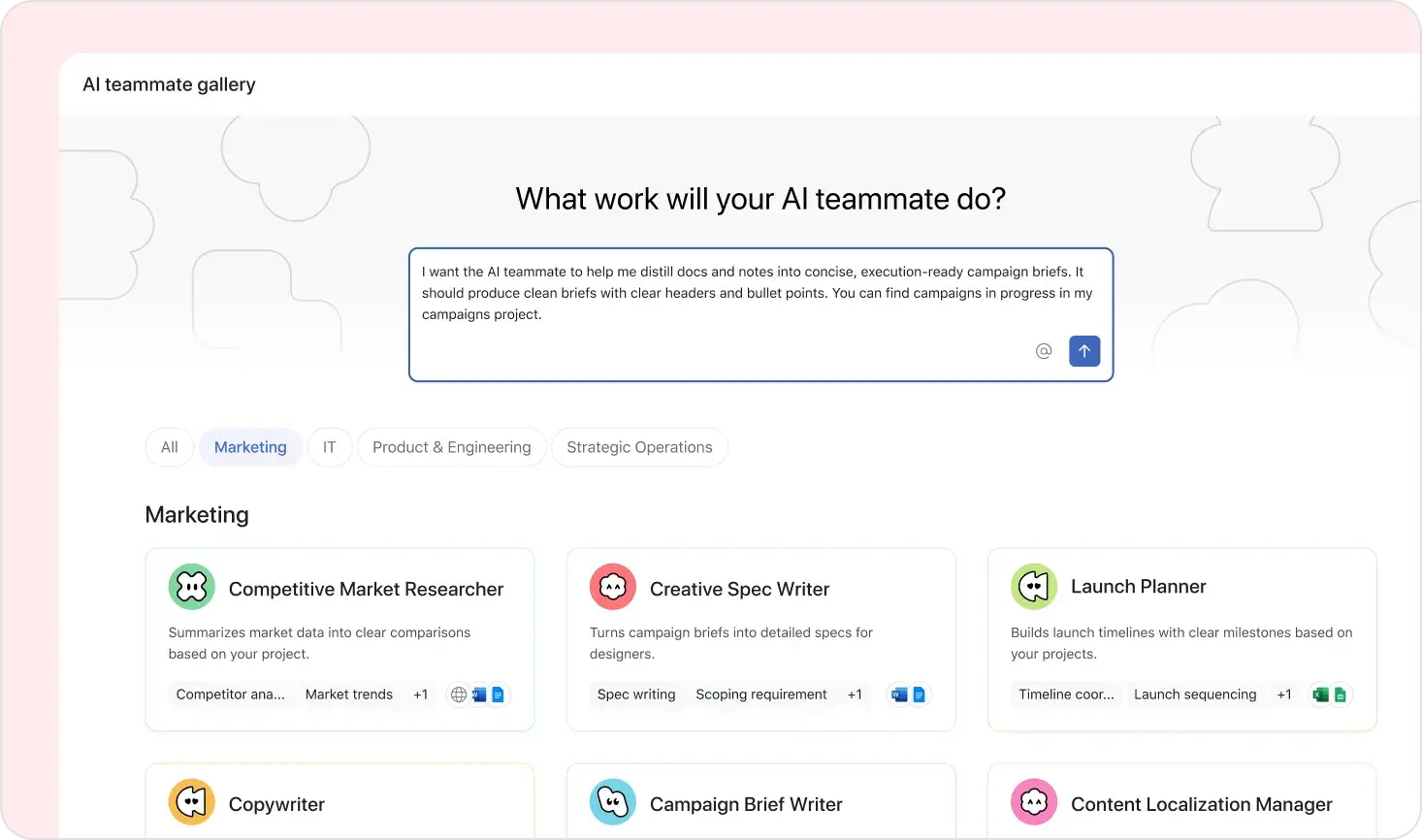
Now here, we start to bring in the concept of Asana's AI teammates. The powerful thing about a teammate is that you can treat it like a coworker. You can assign it work and know that it's going to do something. In this particular creative request workflow, we've got a mix of humans and agents getting a long lived process done. So the initial request comes into Gmail and the human that receives the request assigns tasks to some of the first agents.
And so, these teammates, these agents are gathering requirements and assigning prioritizations. Now, at that point, the agent knows that there needs to be a human in the loop to approve that.
Approvals are becoming more and more important in the age of agency. We want agents to be able to do things, but only to a point, only to that safe point. That's why I wanna preview those 40 tasks before it hits Asana.
So, member of the team, another live breathing member of the team approves that prioritization. The work is now flowing. It's flowing to the next to the next teammate who is trained to create a really effective Google Doc. One of the nice things about teammates is they are something that you can specialize.
If you think about prompts, in that example I gave you a few minutes ago where I I asked Asana Dash to create all of those tasks, I have a prompt that I've honed over many uses and I save that prompt. I save it and I pull it out because I don't wanna have to retype it all from scratch. And sometimes sometimes the AI doesn't get it right. I tweak the prompt and I learn from that and I go, okay, you have to tell it explicitly to add it to this or else it might add it to that thing that's very similar.
So, the prompt is getting smarter over time. Well, one of the nice things about teammates is they are they are a very logical place for you to put that knowledge that you're accreting. As you learn how to create that Google Doc, how to take advantage, slowly you learn, oh wow, there's a new MCP tool that's available and now I can just tell Google Docs to create, add an image in a way that I couldn't previously. I'm putting that into this teammate.
The teammate becomes more and more expert and more and more specialized.
And sometimes when people ask me, what's the difference between when do I use Dash and when do I use Teammates, I really think it kinda comes down to this concept of general versus specialized. Dash is my general purpose gateway to use intelligence with Asana. And teammates are the places where I put specialized guidance to take care... So that I can take advantage of tools as powerful as Gmail and Google Docs and do that effectively.
Now, all of this works on this... You heard me mention this Work Graph, and you heard that this morning too. It's something that you'll hear us at Asana keep coming back to. The Work Graph is the is the mesh or map of all of the information that's being captured by Asana and the relationships between all that information. It's all of the notes, the connections.
It's some of those connections are very explicit, like my boss is Kirk who was here this morning talking about our new pages and tables and meetings. That's an explicit connection. But there's also implicit relationships.
People that you just end up doing a lot of work with, people who you talk to, people that get called in on a certain kind of escalation. We're going to need agents to be smart enough to to understand not just the explicit connections, but also these relationships, the knowledge that Dan mentioned this morning, the information that shows up in a Google Doc or comes in in an in an email that possibly got missed, that all needs to be captured and the WorkGraph provides the best way to do that because it's constantly where your most valuable work is happening. So, the teammates create and read from your Google Workspace applications, they can write to the Google Workspace applications, we can tie all of these powerful sources of your work that live in these different Google's assets, we can tie that into the Work Graph so that they can be most effectively and efficiently used to help you get your work done.
And then, that last bullet point, I haven't mentioned it so far, but it's a really important point that we and Google both spend a lot of time thinking about, which is the security and trust side of the equation.
It's very important that your information stay private unless you choose to make it public, and that the governance tools be in place that let you control who gets access, whether it's for confidentiality purposes or in some cases for financial purposes. I don't want this particular group getting to use these applications because we only have the budget for this this quarter.
So for any variety of reasons, it's critical to make sure that that governance is there and that's something we're focusing on relentlessly at Asana.
And so that's really the story, and what I'm... We're gonna finish up now is just a quick little demonstration video that kind of puts some of this wonderful partnership between Google Workspace and Asana into action.
At work, we all pay a coordination tax, chasing context instead of doing work that matters. Introducing the Agentic Work ecosystem, Asana's vision for a unified environment where work is initiated, orchestrated, and completed.
Google Workspace with Gemini is a key partner in bringing that vision to life. A critical email hits your inbox. A new vendor has been recommended for your upcoming application launch with the timeline already in motion.
Based on rules preconfigured in Workspace Studio, that email triggers an automated action in Asana. Gemini recognizes the intent and hands off directly to Asana's launch coordinator AI teammate. No manual intake. No tickets filed by hand. Before acting, the launch coordinator AI teammate draws from your enterprise memory, analyzing prior launches, cross referencing your approved vendor database, and mapping stakeholder impact across teams.
From that context, it determines the right next steps. Two approval subtasks, automatically created and routed. One to your marketing lead to greenlight the vendor switch, and one to your finance lead to approve the budget change.
The right people are looped in with the right context without anyone having to ask. Collaboration happens where your team already works. Stakeholders receive notifications in Google Chat via the Asana integration, ask questions directly in the thread, and the AI teammate responds, pulling from prior vendor analysis to answer on pricing and budget fit. Once both leads approve, the launch coordinator AI teammate pulls your latest RFP template, fills in what it knows, creates the Google Doc, and notifies the team it's ready to send, all without a project manager personally owning this coordination.
Google and Asana AIs working together with humans in the loop at every decision point. And if there's someone on your team who prefers to work directly in Gemini, Asana Data is available there too. Ask the Gemini app for the current status of your launch, and it surfaces a live, accurate answer, pulling from everything that's happened across both platforms.
With enterprise grade security and permission controls built in, AI only accesses what it's authorized to see. Leave the logistics to us. Focus on leading your business. Google and Asana, better together.
Better together. I like it.
This final story is a customer example. Wikimedia Foundation had this really nice quote, people aren't as lost anymore. The team is aware, changes are clearly documented, and they're syncing their tasks from their donor campaigns to Google Calendar. And that allows them to track with the power of Google Calendar and link all of that calendar information to all of the work they're doing their core effort of raising money.
Just one successful example.
And, with that, we're finishing up here.
And, Avi, I think you were gonna tell a little about what's next.
Yes. Firstly, thank you so much for joining us today, and thank you to our presenters. If you wanna learn more about...
Yeah. Let's hear it. Let's hear it for... Thanks to Google Workspace.
If you wanna learn more about Gemini, please scan this QR code. Thank you again, and have a great rest of the day.
Thank you very much.