
Ninety + Asana
Manage to-dos seamlessly through Ninety and Asana to keep your team aligned.
What is Ninety?
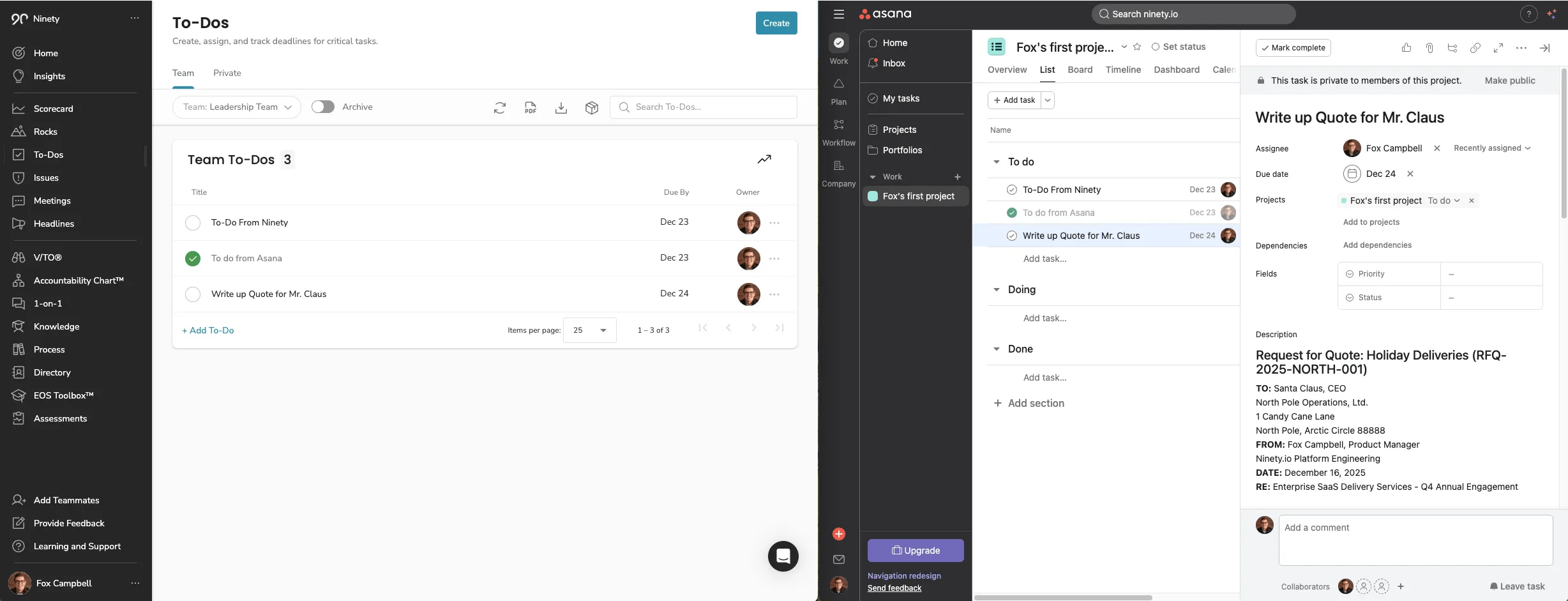
Ninety's Asana integration allows you to sync To-Dos from one of your teams in Ninety with one of your Asana projects. This integration is built for teams already using Asana for project management and Ninety for whole-company operating. With Ninety and Asana working together, you'll have:
- Continuous Sync: Automatically synchronize To-Dos between Ninety and Asana. Changes to task status (completed or not completed), description, and due dates will be updated on both platforms.
- User-Level Control: Individual users can connect their Asana accounts and manage their preferences.
- Streamlined Workflows: Maintain alignment across systems without duplicate entry or switching platforms.
How to connect Ninety + Asana?
- Navigate to your integrations page in user settings (User Settings > Integrations > Marketplace). First, click your name at the bottom of the left navigation. Next, click User Settings. Then, click Integrations. Finally, click Marketplace.
- Begin connecting Ninety to your Asana account. Click the Connect button on the Asana widget in Ninety's integration marketplace.
- Grant access for Ninety to connect to your Asana account. Click “+ Grant Access” and name your connection. Next, click Continue. Then, click the Grant Access button.
- Authorize the integration's required permissions. First, ensure the intended Asana account is shown at the bottom of the page. You can sign in to another Asana account from this window if necessary, by selecting “Not You?”. Next, review the permissions for your integration to operate, then click Allow. Once the connection is confirmed, click OK, thank you.
- Configure the integration between Ninety and Asana. Select which Asana Workspace and project from your Asana account to connect to. You can only select one project, so choose the project you'd like to populate with your new To-Dos from Ninety and from which to send newly created items in that project list to your team's To-Dos list in Ninety. After making your selection, click Continue.
- Sync your Asana list with your To-Dos list. Since Ninety and Asana use different terminology, you'll need to align some necessary fields.
- Choose a team in Ninety. This integration will connect To-Dos associated with this team assigned to you to the above Asana Project. You can only select one team in Ninety with this integration.
- Ensure mapped Asana Task Owner is correct for Ninety to Asana To-Do creation. Verify that the correct field value is selected for the Owner field, which is likely referred to as Assignee in Asana.
- Review and then continue. Review your selections and then click Continue. Please allow a few moments for Ninety and Asana to save your preferences.
- Complete the connection. Click the Let's go! button. The Asana widget on Ninety's integrations marketplace page should now display “Connected” in the top right corner.
- Witness the Bi-Directional Sync of Asana and Ninety. Changes to task status (completed or not completed), description, and due dates will be updated on both platforms.
Note: This integration is available to Ninety users on a paid license from companies on a paid Accelerate or Thrive tier Ninety subscription.
Learn more and get support
To learn more about using the Ninety + Asana integration, visit Ninety.
If you have questions, feedback, or need support, visit the Ninety support page.
Asana does not endorse or certify apps built by third-party developers. If you encounter inappropriate content or behavior, please report it here. Otherwise, please contact the app developer for support.
Collaborate effortlessly with Asana
From the small stuff to the big picture, Asana organizes work so teams know what to do, why it matters, and how to get it done. It's free to get started, simple to use, and powerful enough to run your entire business. Learn more about Asana today.