


Workroom + Asana
Workroom synchronizes interior designer workflows and processes.
What is Workroom?
From the first saved product to the final payment, Workroom keeps projects, people, products, purchasing, time, clients and finances moving together — so the person running the firm can answer their own questions about money, hours and margin without hiring a CFO or waiting on the accountant.
How to connect Workroom + Asana?
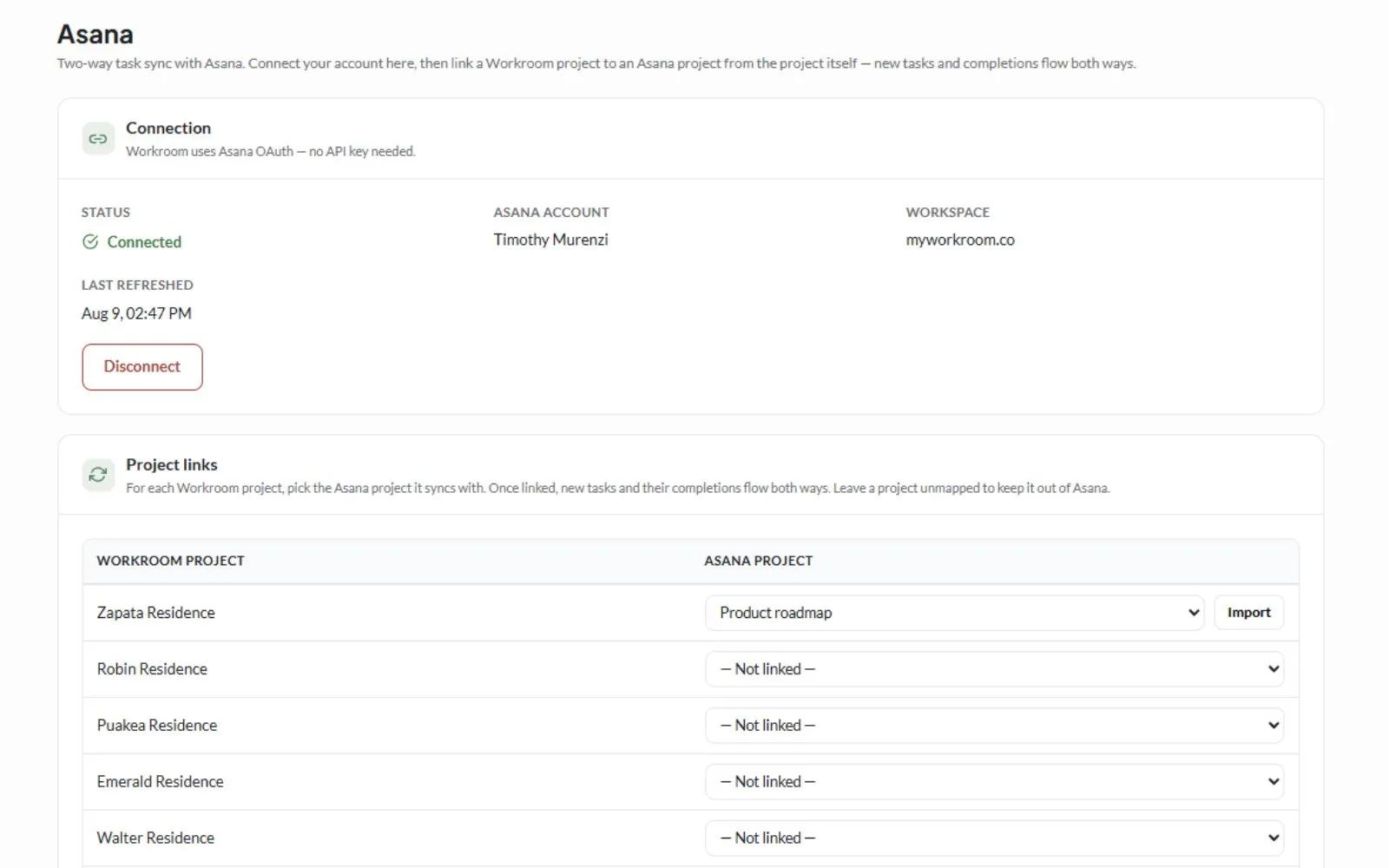
- In Workroom (Pro plan or higher), go to Settings → Integrations → Asana.
- Click "Connect Asana."
- On Asana's consent screen, click Allow. You'll get redirected back to Workroom.
- In the Project links table, choose an Asana project for each Workroom project you want to sync.
- If the Asana project already has existing tasks, click Import to pull them in (safe to re-run, no duplicates will be created).
Learn more and get support
To learn more about using the Workroom + Asana integration, visit Workroom.
If you have questions, feedback, or need support, visit the Workroom support page.
Asana does not endorse or certify apps built by third-party developers. If you encounter inappropriate content or behavior, please report it here. Otherwise, please contact the app developer for support.
Collaborate effortlessly with Asana
From the small stuff to the big picture, Asana organizes work so teams know what to do, why it matters, and how to get it done. It's free to get started, simple to use, and powerful enough to run your entire business. Learn more about Asana today.