


AI project plan template
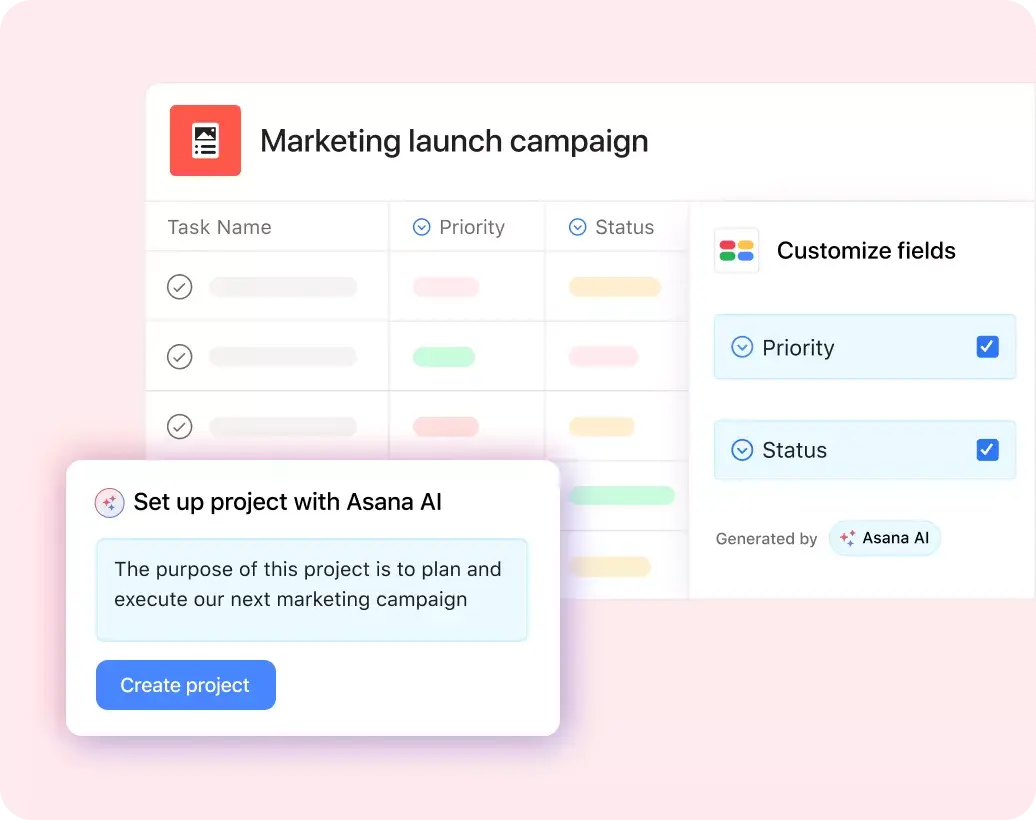
Describe your project. Asana AI creates an AI project plan with tasks, milestones, owners, timelines, and dependencies. Your team can then run the work in Asana, customize the plan in List, Board, Timeline, or Gantt view, and export it to CSV or PDF when needed.
註冊即可建立您的專屬範本。
AI project plan template
Describe your project. Asana AI creates an AI project plan with tasks, milestones, owners, timelines, and dependencies. Your team can then run the work in Asana, customize the plan in List, Board, Timeline, or Gantt view, and export it to CSV or PDF when needed.
Create your template註冊即可建立您的專屬範本。
整合功能
Recommended apps





Summary
Most free AI project plan generators aren’t much use after the first draft. They’ll outline a project for you, but you’ll still have to manually convert that AI project plan template into something your team can review, update, and manage as deadlines, blockers, and approvals change.
However, Asana pairs AI project planning with a work management platform. The Work Innovation Lab’s Scaling AI in 2025: IT Trends report found that organizations scaling AI adoption, called AI Scalers, report 2-3x stronger outcomes in productivity, planning, and collaboration than organizations that have not scaled AI. With Asana, your team can create a project plan with AI and then coordinate and manage the work all in one shared platform.
What is an AI project plan?
An AI project plan is a structured project plan generated from a prompt or brief. It usually includes scope, tasks, timelines, dependencies, milestones, and owners. With Asana, AI project planning is integrated directly into its work management app, where your team can assign work, update progress, and track blockers.
How to create an AI project plan in Asana
To create an AI project plan, start with the outcome your team needs to deliver. Then use Asana AI to draft the initial structure, review the details, and turn the plan into a project your team can manage day to day.
1. Describe your project goal
Start with a short project brief. Include the project objectives, deadlines, stakeholders, deliverables, and any known constraints.
A prompt like “Create a project plan for a six-week product launch with tasks for marketing, design, legal review, sales enablement, and launch reporting” gives AI more useful context than a one-line request.
Add details your team already knows, such as action items, approval steps, review dates, budget limits, or dependencies. The more specific your brief, the more useful the first draft will be.
2. Generate tasks, milestones, and timelines
Use Asana AI to turn the brief into project timelines, task lists, subtasks, and milestones with suggested dates. For example, a product launch plan might include sections for kickoff, messaging, creative production, channel planning, stakeholder review, launch, and reporting.
Review your AI-generated plan before your team uses it. Remove irrelevant tasks, add missing project details, and adjust timelines based on your team’s actual capacity.
3. Customize your AI project plan
Shape the template around your team’s needs. Use List view to scan task details, owners, due dates, and custom fields. Use Kanban Board view when work advances through stages, such as planning, in progress, review, approved, and done.
Use Timeline or Gantt chart view when the project depends on sequence. Product launches, IT rollouts, construction projects, and cross-functional initiatives often require a project schedule because a single missed approval can delay subsequent tasks.
4. Assign owners and AI Teammates
Assign each task to a human-in-the-loop so everyone knows who will complete the work. For tasks with handoffs, add subtasks for each contributor or reviewer. Assign AI Teammates to coordination tasks, such as drafting status updates, flagging blockers, summarizing project context, or following up on recurring tasks. Human teammates still review decisions, but AI can reduce manual admin.
5. Add dependencies and custom fields
Roadmap dependencies so your team can see which tasks need to happen first. For example, a design review may need to finish before web production starts. A legal review may need to finish before paid ads go live. Add custom fields for status, priority, department, task type, effort, approval stage, or risk. Start with fields your team will actually use. Too many fields can turn a useful project plan into unnecessary admin.
6. Track progress with status updates
Decide how your team will report progress before starting any work. Use status fields for stages such as not started, in progress, blocked, under review, and done. In Asana, AI Teammates can draft project status updates that summarize progress, risks, and next steps.
7. Reuse the AI plan as a template
After the project ends, review what worked. Remove one-off tasks, update section names, refine dependencies, and save the structure as a reusable template for future projects. A reusable AI project plan template works especially well for recurring project types, such as product launches, business plans, marketing campaigns, client onboarding, operations projects, and annual planning.
What’s included in this template?
When you create a project plan with AI, you not only give your team a starting point for planning and managing work, but you also save time. And in Asana, you can adjust each part of your AI project plan template before beginning your project.
Planning sections to organize your goals, scope, stakeholders, project phases, and work intake details.
List view to visualize your project’s work breakdown structure (WBS), so your team can see how major deliverables break down into smaller steps before assigning work.
Project execution sections to manage tasks, subtasks, owners, due dates, milestones, and dependencies.
Review sections to track approvals, bottlenecks, feedback, and final sign-off.
Custom fields to organize work by priority, status, department, task type, effort, or approval stage.
AI Teammates to generate status updates, follow-ups, summaries, and recurring coordination tasks.
Over 200 integrations to connect your Asana project to tools like Slack, Microsoft Teams, Google Workspace, Jira Cloud, and Salesforce.
Why create a project plan with AI?
Using an AI tool to create project plans helps teams get past the blank-page stage. Instead of starting with a spreadsheet, a doc, or a long planning meeting, you simply describe the project and quickly get a customized plan.
The real value of AI project planning comes after that first draft. In Asana, you can turn AI-generated planning into a working project that your team can adjust as it evolves. That means you can start with AI, then manage the work without having to rebuild the plan in another tool.
An AI project planner gives you more than a simple project plan template. A static template can help you organize the first version of the plan, but it won’t suggest updates when dates change or automate next steps. The financial services team at Morningstar demonstrates this benefit perfectly. According to Asana’s Morningstar customer story, the Research team built an AI-powered content pipeline in Asana that saves about 14,976 hours per year.
See how AI Teammates workUseful features for AI project planning
Asana features help your team create, manage, and update an AI project plan without having to rebuild it in another tool. Explore all Asana AI features to see more ways to plan work with AI.
AI Studio: Build AI-powered workflows for repeatable planning steps, such as intake, routing, project setup, stakeholder summaries, risk checks, and status updates.
AI Teammates: Assign AI Teammates to coordination tasks alongside human teammates. For an AI project plan, they can help summarize project context, draft updates, flag blockers, and follow up on recurring work.
Asana Dash: Use Asana Dash to bring project context from meetings, emails, and work tools into Asana, then turn that context into structured next steps.
Agentic Work Management: Use Asana’s AI work management tools to draft plans, automate routine updates, review next actions, and connect AI tools like ChatGPT, Claude, and Gemini to Asana’s Work Graph.
Custom fields: Add fields for priority, status, phase, department, owner, approval stage, blocker, or effort. Custom fields make sorting and reporting easier as the project grows.
Rules: Automate repeatable steps, such as assigning review tasks, moving completed work to the next section, or notifying a stakeholder when a task changes status.
Goals: Connect your AI project plan to team or company goals so people can see why the work matters and how progress ties back to the larger plan.
Who uses AI project plan templates?
AI project plan templates are useful for teams already using AI in their workplace. Asana’s State of AI at Work report found that 29% of knowledge workers use AI in project management workflows, 28% in progress monitoring workflows, and 23% in goal management workflows, which makes project management the top AI adoption area.
Project managers can use AI project planning to draft project phases, assign owners, map dependencies, and prepare stakeholder updates.
Operations leads can use an AI project planner to turn recurring processes into repeatable project templates with intake steps, routing rules, and review tasks.
Marketing teams can use AI to create project plans for campaigns, content launches, events, creative production, and reporting.
IT teams can use a project plan for AI implementation, software rollouts, migrations, vendor reviews, and security projects.
Cross-functional teams can use one shared plan when work involves product, marketing, design, sales, legal, finance, or operations.
Leadership teams can use AI-generated plans to break strategic initiatives into owners, milestones, dependencies, and progress updates.
Related templates
Tips for getting the most from your AI project plan
Asana AI can give you a faster first draft, but your team still needs to review the plan before using it. Treat its AI project plan generator as a starting point, then add the details that only your team knows.
Start with a specific brief. Include a project overview, deadline, stakeholders, deliverables, constraints, and required approval steps.
Review dependencies before assigning work. AI can suggest a task order, but your team should confirm which tasks truly depend on one another.
Give every task one owner. Shared ownership can slow work because no one knows who owns completion.
Create separate tasks for reviews and approvals. Review time often causes delays, so give reviewers their own due dates.
Assign AI Teammates to recurring coordination work. Status updates, blocker summaries, and follow-ups are good starting points.
Map the plan to goals. Goal links help teams understand which work matters most when timelines change.
Update the template after each project. Remove unused fields, add missed steps, and adjust sections that caused confusion.
Integrations for your AI project plan generator
Integrations connect Asana with the tools your team already uses, so project context does not get stuck in separate apps. Explore all Asana integrations to find more apps for your AI project plan.
Slack: Turn Slack messages into Asana tasks, add comments to tasks from Slack, and receive task updates where your team already talks about work.
Microsoft Teams: Connect conversations to Asana tasks so teammates can create follow-ups from meetings and messages.
Google Drive: Connect planning docs, briefs, and project files to the related Asana work so teammates can find the right context from the task.
Jira Cloud: Connect technical work to the project plan when engineering tasks need to stay in Jira and business teams need project status in Asana.
Salesforce: Connect customer-facing work to project tasks when sales, customer success, or implementation teams need shared context.
Try Asana for AI project planning
Create an AI project plan in Asana to do more than generate a document. Start with a prompt, turn the output into a project, and give your team one place to assign tasks, update dates, manage dependencies, and report progress.
Asana AI helps draft the plan. AI Teammates can help with coordination work after the plan begins. Your team still owns the decisions, but they do not have to manually manage every status update, follow-up, and blocker check.
Start building your AI project plan in Asana today.
Create this templateFAQs about AI project plans
The 10-20-70 rule says 10% of AI effort goes to algorithms, 20% goes to technology and data, and 70% goes to people and processes. For AI project planning, the rule means the tool matters, but adoption matters more. Teams still need defined goals, agreed review steps, responsible owners, and a process for turning AI output into finished work.
AI projects often fail because teams start with vague goals, poor data, unclear ownership, or weak change management. A project may also stall when teams skip review steps, underestimate technical work, or fail to define what success looks like. A structured AI project plan can reduce those risks by setting responsibilities, decision points, deadlines, and review steps before execution begins.
The five steps of the AI project cycle are:
Problem scoping: Define the business problem, success criteria, stakeholders, and constraints.
Data acquisition: Gather the data needed for the AI project.
Data exploration: Review the data to find patterns, gaps, risks, and quality issues.
Modeling: Build or configure the AI model or system.
Evaluation: Test the output, review performance, address risks, and decide whether the project is ready to launch.
A project plan for AI implementation turns each step into scheduled work with owners, deadlines, review points, and dependencies.
Examples of AI projects include:
Chatbot deployment for customer questions, employee support, or internal knowledge search
Predictive analytics for sales forecasts, demand planning, or risk scoring
Recommendation engines for products, content, or next-best actions
Process automation for repetitive tasks like intake, routing, tagging, or reporting
AI-assisted content operations for briefs, drafts, approvals, and publishing workflows
Customer support routing that sends tickets to the right team based on topic, urgency, or account type
These projects often involve business stakeholders, technical teams, legal, security, operations, or customer-facing teams. A shared AI project plan helps those groups manage decisions, timing, dependencies, and approvals from the first draft through delivery.
The best AI for project planning depends on whether you need a static document, a calendar, or a work management platform. A simple AI generator may work when you only need a draft plan. Asana works well when you want to create the plan with AI, customize it with your team, and manage the work in the same place with project views, AI Teammates, automations, and progress tracking.
使用 Asana 建立範本
瞭解如何在 Asana 中建立可自訂的範本。立即開始使用。