


Com tecnologia de IA
Pedidos de criação
Desde o recebimento de um pedido até a sua entrega final, com este modelo de solicitação de criação você mantém o seu processo criativo operando sem problemas.

![[Modelos] Pedidos de criação — imagem principal](https://assets.asana.biz/transform/f7940807-c1a8-4e92-8f04-54a9b75de3b5/Creative-requests-Creative-Production-Workflow-Package?io=transform:fill,width:2560&format=webp)
Com tecnologia de IA
Pedidos de criação
Desde o recebimento de um pedido até a sua entrega final, com este modelo de solicitação de criação você mantém o seu processo criativo operando sem problemas.



Agilize os pedidos de criação para manter as campanhas em dia
Um modelo de formulário de pedido de criação oferece às equipes um processo padronizado para coletar, revisar e encaminhar o trabalho criativo recebido sem ter que classificar manualmente os envios. Cada pedido entra no mesmo fluxo de trabalho, para que as equipes possam ver o que requer atenção, quem é responsável por cada etapa e como os projetos progridem desde o recebimento até a entrega. Com os campos personalizados, as automatizações e a IA Asana, você gasta menos tempo procurando detalhes e mais tempo transformando cada solicitação em um brief de criação detalhado.
Receba pedidos de criação por meio de um fluxo de trabalho de recebimento rápido e fácil.
Um formulário integrado captura os detalhes necessários, enquanto identificadores exclusivos, acompanhamentos por e-mail e comentários exclusivos para a equipe proporcionam um local central para as equipes reunirem contexto antes de começar a trabalhar.
Revise e prepare os pedidos de criação mais rapidamente com a IA.
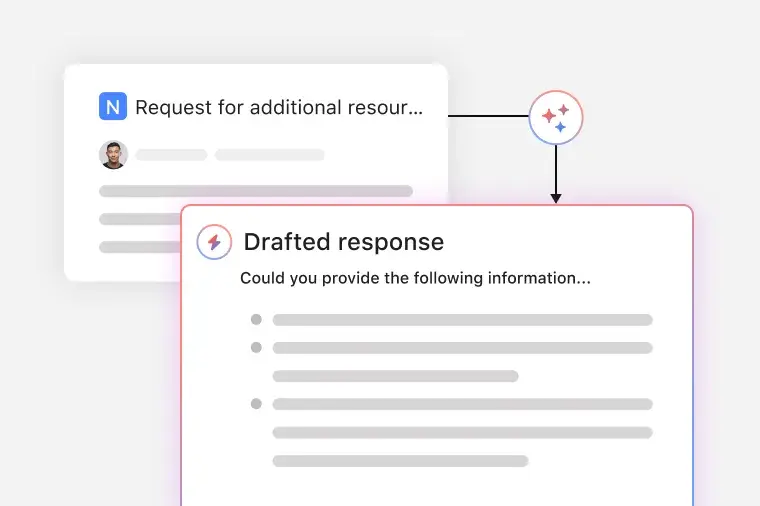
A IA nomeia cada envio, solicita informações ausentes e elabora respostas para ajudar as equipes a processar as solicitações rapidamente, evitando o acompanhamento repetitivo.
Organize o trabalho criativo com status personalizados.
Os tipos de status personalizados ajudam as equipes a categorizar as solicitações, monitorar o progresso e identificar os itens que precisam de atenção.
Automatize os cronogramas e prazos de cada solicitação.
As regras definem as datas de conclusão com base no tipo de solicitação, para que as equipes planejem as cargas de trabalho sem agendamento manual.
Monitore as cargas de trabalho e o progresso das equipes de criação num único painel.
Os gráficos de desempenho exibem o volume, o tempo e as tendências para que as equipes entendam como as solicitações progridem e possam ajustar o fluxo de trabalho conforme necessário.
Quando usar um modelo de formulário de pedido de criação
Um modelo de pedido de criação da Asana ajuda a equipe a reunir os detalhes do projeto de forma padronizada antes do início do trabalho. Se você receber mensagens vagas como “Você pode fazer isso?” ou “Precisamos de um design rápido”, um formulário de solicitação de projeto criativo fornece as informações necessárias para definir o escopo do trabalho, as expectativas e concluir o projeto sem falhas de comunicação.
As equipes usam um formulário de pedido de criação quando atendem a várias partes interessadas, gerenciam um alto volume de pedidos ou precisam de uma maneira estruturada de solicitar serviços de design gráfico, Web design, conteúdo de mídia social ou projetos de marketing. Com um formulário de pedido de criação da Asana, todas as solicitações são enviadas no mesmo formato, o que facilita aos membros da equipe atribuir tarefas, definir cronogramas e priorizar projetos de criação para mantê-los dentro do prazo.
Este modelo de pedido é uma boa opção quando você deseja:
Centralizar todos os pedidos que chegam. Defina prioridades e entenda tudo em que a sua equipe criativa está trabalhando ao gerir todos os pedidos com a mesma ferramenta.
Obtenha todos os detalhes necessários. Informações perdidas, como requisitos de criação ou especificações de design, podem atrasar o trabalho. Use um formulário para ajudar as equipes a enviar pedidos com todos os detalhes necessários.
Defina as expectativas. Determine a prioridade de cada solicitação recebida, atribua a tarefa a alguém e defina prazos para que todos saibam quem está criando o quê e qual é o prazo.
Acelere o ciclo de feedback. Agilize o processo de aprovações monitorando o feedback e as observações junto com o trabalho e os ativos criativos.
Com um formulário compartilhado de recebimento de criação, a sua equipe pode se concentrar na produção de ativos de criação, materiais impressos, ativos de eventos e outros materiais de apoio para as equipes de marketing.
Como usar um modelo de formulário de pedido de criação
O modelo de fluxo de trabalho de pedidos de criação da Asana oferece às equipes um método consistente para coletar, revisar e concluir trabalhos de criação em um local centralizado. Você começa na visualização principal do projeto, onde todas as solicitações ativas são exibidas, e depois navega até os formulários, campos e regras que orientam o progresso do trabalho, desde o recebimento até a finalização. Este modelo ajuda as equipes criativas a lidar com a demanda de forma mais eficiente, reduzindo as mensagens pontuais e estabelecendo um processo de recebimento mais previsível.
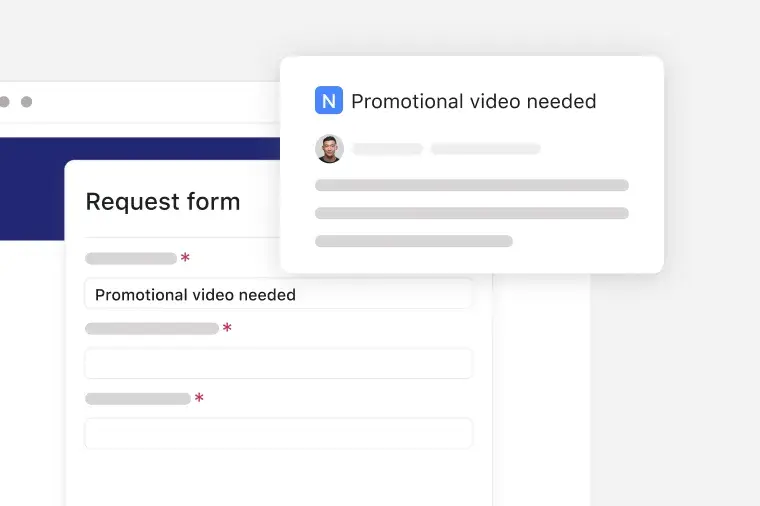
Receba pedidos de criação por meio de um formulário
Você coleta todas as necessidades criativas recebidas por meio de um formulário integrado que reúne os detalhes do projeto, as metas e os ativos necessários. O modelo atribui a cada envio uma ID exclusiva e oferece às equipes um espaço de trabalho para adicionar acompanhamentos por e-mail e comentários exclusivos da equipe à medida que refinam o brief.
Analise os pedidos de criação com IA
A IA nomeia novos envios, solicita informações ausentes aos solicitantes e elabora respostas para que as equipes classifiquem e qualifiquem o trabalho mais rapidamente. A assistência por IA elimina a triagem manual e encaminha os pedidos de criação para a produção com menos atrasos.
Organize os pedidos de criação por status
O modelo categoriza o trabalho usando etapas de status personalizadas que correspondem ao seu processo criativo. Esses status mostram o que é novo, em revisão, em produção ou pronto para entrega, para que a sua equipe se concentre nas solicitações certas no momento certo.

Defina automaticamente as datas de conclusão para as solicitações
Rules automatically assign due dates based on request type, providing creative teams with reliable timelines without manual scheduling. Automation keeps production on track, even during busy periods.

Acompanhe o progresso com os painéis
Os painéis oferecem às equipes uma visão do volume de solicitações, da taxa de transferência e do tempo em todas as etapas do trabalho criativo. Gráficos e diagramas ajudam as equipes a entender as tendências da carga de trabalho e a identificar onde os pedidos de criação ficam retidos.

Este modelo de fluxo de trabalho para pedidos de criação é como um par de mãos extra que organiza os pedidos de criação, destaca as próximas etapas e mantém o trabalho em andamento rumo à entrega. Ele apoia todas as etapas do processo, desde o brief inicial até a entrega final, para que as equipes saibam o que fazer e quando. À medida que mais solicitações fluem pelo sistema, esse fluxo de trabalho pronto reduz o atrito, melhora o tempo de resposta e dá às equipes criativas espaço para se concentrar na produção de trabalho criativo.
Transforme a forma como a sua equipe gerencia os pedidos de criação com a IA Asana. Cada funcionalidade melhora o seu fluxo de trabalho e ajuda a progredir do recebimento à entrega com menos esforço manual.
Analise os pedidos de criação com a IA. A IA analisa cada envio e ajuda a ordenar e compreender o trabalho à medida que ele chega. Você obtém uma avaliação mais rápida do escopo, do cronograma e das próximas etapas sem atrasar o processo de solicitação.
A IA nomeia automaticamente cada solicitação. A IA lê o envio e gera um título específico para evitar sobrecarregar a sua lista com nomes vagos. Você sabe do que se trata cada solicitação antes de abri-la.
A IA faz o acompanhamento para obter informações ausentes. Quando um solicitante omite detalhes importantes, a IA envia uma mensagem de acompanhamento solicitando os detalhes necessários. Isso garante que as solicitações sejam completas na primeira tentativa e ajuda a equipe a evitar longas conversas.
A IA elabora respostas. A IA gera uma resposta com base nos detalhes e no status da solicitação. Isso ajuda a aprovar, recusar ou solicitar alterações com menos digitação. A sua equipe também pode personalizar a mensagem antes de enviá-la.
Clientes que usam modelos da Asana para trabalhar



![[Logo] Affirm](https://assets.asana.biz/transform/5c33f186-151e-4999-b0b5-4081f236b3cd/Affirm_logo-svg?io=transform:fill,width:2560&format=webp)





Perguntas frequentes
Um formulário de pedido de criação é uma estrutura para reunir os detalhes necessários para iniciar novos projetos criativos, e fornece às equipes um processo de solicitação padronizado que captura metas, cronogramas, públicos-alvo e qualquer contexto de apoio em um só lugar. Ao usar um formulário de solicitação da Asana, as equipes podem supervisionar o processo criativo de todas as perspectivas, com menos perguntas e decisões mais rápidas.
Um modelo de formulário de pedido de criação bem elaborado orienta os solicitantes a fornecer os detalhes necessários prontamente e ajuda as equipes a entender o escopo, a finalidade e os ativos necessários antes de iniciar o trabalho. Os formulários de ordem de serviço mais eficazes apresentam seções para metas, prazos, públicos-alvo e materiais de referência.
Bons exemplos de formulários de solicitação incluem formulários de solicitação de marketing, formulários de recebimento de design, briefs de produção e outros envios estruturados que ajudam as equipes a começar a trabalhar com as informações necessárias. Muitas equipes também usam um formulário de solicitação de design gráfico para ativos visuais ou um formulário de campanha para iniciativas maiores. Cada tipo de formulário deve oferecer aos solicitantes uma maneira padronizada de compartilhar os detalhes necessários para iniciar o trabalho.
A razão para usar um modelo de formulário da Asana em vez de um documento do Google ou do Word é que a Asana converte cada envio em um fluxo de trabalho monitorável, onde tarefas, proprietários, datas e contexto estão todos em um único espaço de trabalho. A Asana também oferece lógica condicional, comentários e recursos de Automatização que ajudam as equipes a atribuir trabalhos, responder a perguntas e manter os projetos em andamento na plataforma de gestão de projetos.
Você pode aprimorar os formulários de pedido de criação refinando os campos para solicitar informações úteis e reduzir as perguntas de acompanhamento. Você também pode melhorar os resultados automatizando a atribuição de projetos, prazos e notificações para que cada solicitação chegue ao membro certo da equipe sem triagem manual. Revise regularmente o seu fluxo de trabalho e atualize os formulários à medida que o processo de solicitação de marketing evolui.