


Free marketing calendar template
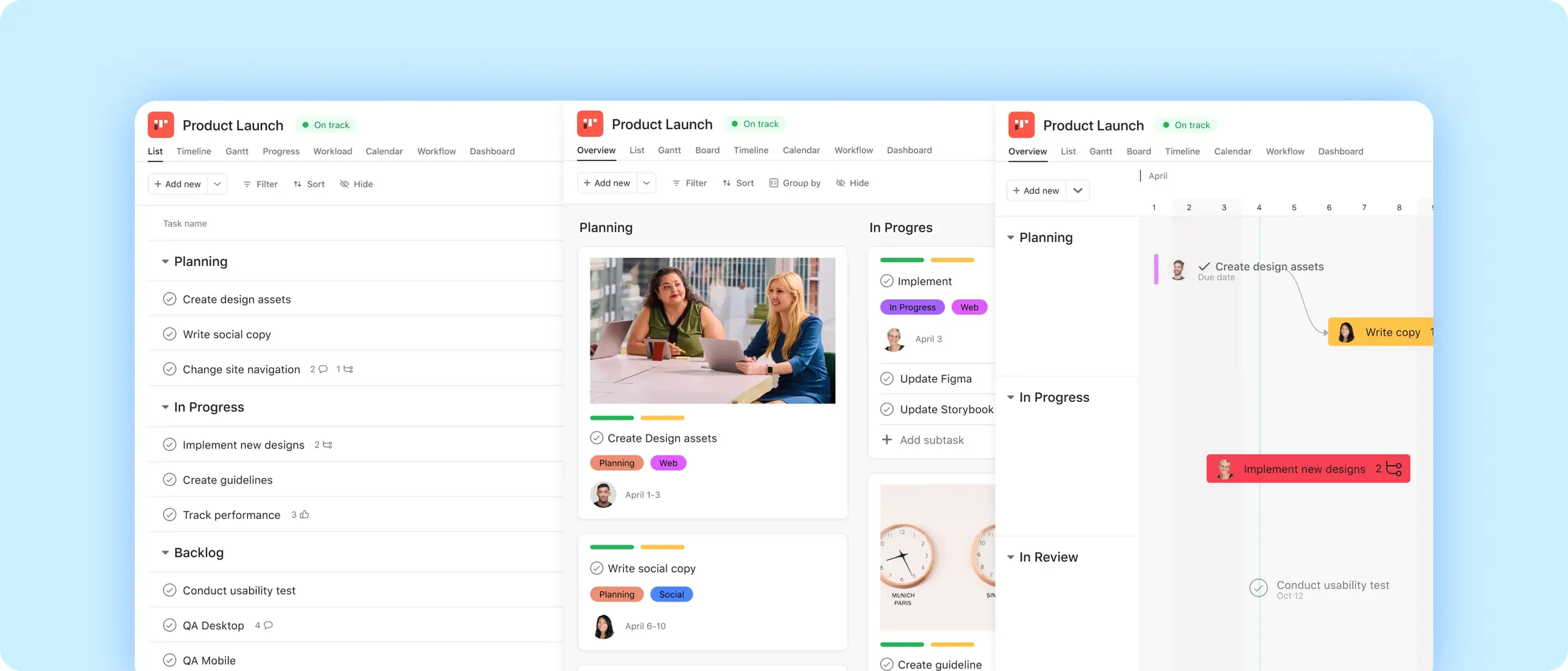
When a marketing plan lives across spreadsheets, emails, and documents, it's hard to know what's launching, when, and who's responsible. Give your whole team one place to plan, schedule, and track every campaign and activity.
Iscriviti per usare questo modello.
Free marketing calendar template
When a marketing plan lives across spreadsheets, emails, and documents, it's hard to know what's launching, when, and who's responsible. Give your whole team one place to plan, schedule, and track every campaign and activity.
Use templateIscriviti per usare questo modello.
FUNZIONALITÀ INTEGRATE
Recommended apps




Summary
What is a marketing calendar?
A marketing calendar is a shared planning tool that maps all your marketing activities—campaigns, content, email sends, social posts, events—to dates, owners, and channels. It gives everyone on the team a single view of what's happening and when, so nothing gets missed and no one is guessing at priorities.
Types of marketing calendars
Most marketing teams need more than one calendar view. Here are the most common types and when to use each:
Content marketing calendar: Plan and track blog posts, articles, and other content from draft through publication.
Email marketing calendar: Schedule email sends, manage audience segments, and track campaign performance in one place.
Social media calendar: Organize posts by platform, schedule publishing dates, and align social activity with broader campaigns.
Campaign calendar: Map multi-channel campaigns from kickoff to go-live, with owners and deadlines for every workstream.
Holiday marketing calendar: Plan seasonal promotions and time-sensitive campaigns well in advance so your team isn't scrambling when key dates arrive.
Asana's marketing calendar template works as a hub for all of these, with the flexibility to filter by channel, owner, or status depending on what your team needs to see.
What to include in a marketing calendar
A useful marketing calendar tracks more than just dates. Each entry should include:
Campaign name: A clear label so anyone on the team knows what they're looking at.
Channel: Where each campaign or activity lives: email, social, paid, content, etc.
Owner: One person responsible for keeping the task on track.
Start and end dates: The full window of activity, not just the go-live date.
Status: Where things stand: in progress, in review, scheduled, published.
Linked goals: How this campaign connects to your team's broader objectives.
In Asana, custom fields make each of these trackable and filterable across your entire calendar.
How to create a marketing calendar in Asana
1. Open Asana and use the template: Start from Asana's marketing calendar template. The structure is already there—campaigns as tasks, with fields for channel, owner, and status.
2. Add your campaigns as tasks with due dates: Create a task for each campaign or activity. Set start and end dates so the full timeline is visible in Calendar and Timeline views.
3. Assign owners: Every task gets one person responsible for it. Asana notifies them automatically when work is ready to start or when something is overdue.
4. Switch to Calendar or Timeline view: See your marketing activities laid out by date, spot gaps, and check that nothing is competing for the same window.
5. Set up automations for status updates: Use Asana's automation rules to move tasks through stages automatically, from in progress to in review to scheduled.
6. Connect campaigns to goals: Link your calendar tasks to company-wide goals in Asana so leadership can see how individual campaigns map to broader strategy without asking for a status update.
Create this templateWhy use a marketing calendar template instead of a spreadsheet
Many teams start with a marketing calendar in Excel or Google Sheets. It works at first but breaks down quickly: two people edit the same version, dates change without anyone noticing, and keeping everyone current means sending the file again and again.
A live marketing calendar in Asana updates in real time. Every change is visible to the whole team the moment it's made. Automations handle notifications, and Calendar, Timeline, and List views let different team members see the same plan in the format that works for them. For teams that still need a spreadsheet, Asana exports to CSV.
The efficiency gains add up quickly. Teams using Asana have cut time spent on manual administrative tasks by 35%.
When project details live in siloed files or email, visibility drops. Our research shows that 47% of marketing professionals are only vaguely familiar with their department's annual objectives, often because those goals are buried in email threads. A live marketing calendar changes this by connecting campaigns directly to company-wide goals, ensuring everyone understands how their work maps to the bigger picture.
Marketing calendar example
Here's what a Q3 product launch calendar might look like in Asana.
Your go-live date is September 1. Working backward, you map four workstreams across the quarter:
Content: Blog posts and landing pages drafted in July, reviewed in August, published the week of launch.
Email: Nurture sequence built in July, tested in August, scheduled to send August 28–September 3.
Social: Creative assets produced in July, copy approved by August 15, posts scheduled across platforms.
Paid: Campaign briefs due July 15, creative live in ad platforms by August 20.
Each workstream is a section in your Asana calendar. Tasks move through review → approved → scheduled → published as they progress. Anyone on the team — or in leadership — can open the calendar and see exactly where each piece stands.
Tips for managing your marketing calendar
Batch-plan quarterly, adjust monthly: Set your full quarter in one planning session, then do a lighter review each month to account for what's changed.
Use automations to notify reviewers: When a task moves to "in review," Asana can automatically notify the right person, no follow-up email needed.
Multi-home tasks across projects: If a campaign touches both the content team and the email team, add the same task to both projects so everyone stays aligned without duplicating work.
Review weekly in a portfolio dashboard: A quick weekly scan of your marketing calendar keeps small delays from becoming launch problems.
Use AI Teammates to flag conflicts: AI Teammates can surface scheduling conflicts and flag tasks at risk before they affect your timeline.
Case Study: Fireclay Tile
Create this template
Frequently Asked Questions
A marketing calendar should include campaign names, channels, owners, start and end dates, status, and linked goals to ensure full visibility into every workstream. Beyond these basics, high-performing calendars use custom fields to track budget, priority levels, and target audience segments, allowing teams to filter views by channel or owner. For example, a Q3 product launch calendar would map content, email, social, and paid campaigns backward from a go-live date, ensuring creative assets and briefs are completed well in advance.
The 70/20/10 rule is a budget allocation framework where you spend 70% on proven marketing channels, 20% on emerging opportunities, and 10% on experimental tactics. This strategy prevents over-investment in unverified trends while ensuring your marketing engine remains innovative. A marketing calendar helps you visualize this split across the quarter, making it easy to identify if your plan is too heavily weighted toward "safe" activities or if you are neglecting the experiments needed for long-term growth.
The value of a marketing calendar is that it provides a single source of truth for all activities, eliminating the inefficiencies of siloed spreadsheets and email threads. Research shows that teams using a live, collaborative tool like Asana can reduce time spent on manual administrative tasks by 35% and cut campaign planning time by up to 50%. By connecting individual campaigns directly to department objectives, a calendar also closes the visibility gap—addressing the fact that 47% of marketers often feel disconnected from their company's annual goals.
Crea modelli con Asana
Scopri come creare un modello personalizzabile su Asana. Inizia oggi stesso.