
Inbox is your real-time notification center in Asana. But it’s not the scary, overwhelming notification center you’re probably most familiar with: your dreaded email inbox. Unlike email, Inbox puts you in control of the messages you receive, and (now) lets you decide when to take action on those messages or archive them, quickly.
Successful teams in Asana rely on Inbox to stay in the loop on important tasks and projects, connect with their teammates at their desks and on the go, and prioritize work quickly. Many teams end up turning off Asana email notifications, working with their teams exclusively out of Inbox and My Tasks, and ditching internal email entirely. But, we’ve heard from some teams that turning off email notifications is a hurdle because some parts of Asana Inbox felt cumbersome.
We have been working on some improvements to make Inbox easier to jump into, quickly. We took the best things about Inbox — putting you in control of your message volume, getting to “Inbox zero” quickly, and staying on top of the information that is essential to moving work forward — and made them even better.
A better way to archive
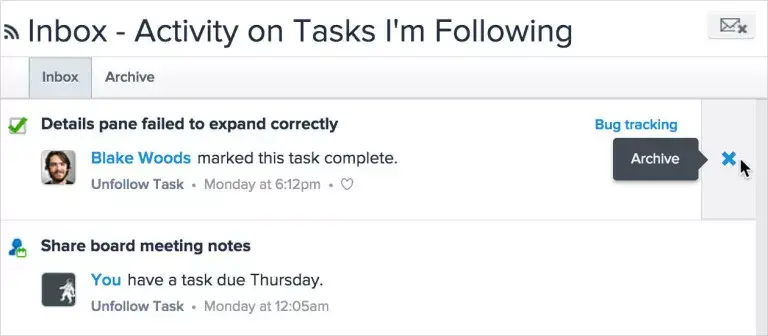
We used to archive Inbox notifications as soon as you clicked on them. We optimized for efficiency, but this functionality actually made it more difficult for some of you to find messages after you’d archived them. Now, Inbox puts you in total control of archiving a story: just hover over any notification and click the x on the right to remove it from your Inbox.
This way, you can make Inbox work for you: if you like to keep a clean Inbox, you can archive things you just aren’t ready for and come back to them later (before you even load the right pane to see the task details). Or, you can just leave unread messages in your Inbox and browse them at your convenience, without marking them ‘Keep Unread.’ Any messages you’ve previously marked as “Keep Unread,” can now be found in a task assigned to you, with links to all those messages.
Two tabs are better than one: Inbox & Archive
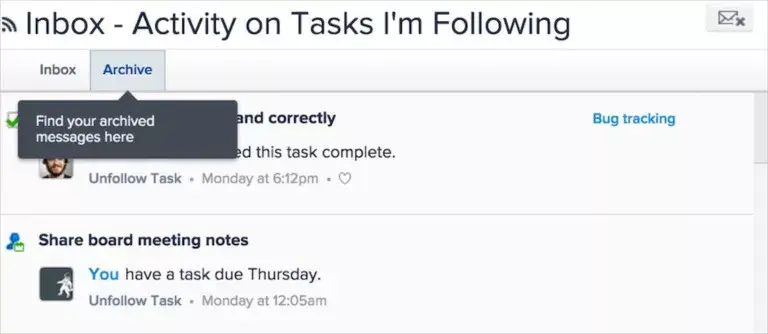
So where do those archived Inbox notifications go after you click the “x”? You’ll find them under the new “Archive” tab. New stories and those you’d like to keep top of mind either for action or reference will remain in your Inbox tab. This mimics the Inbox you’ll find on our mobile apps, making it easier for you to effortlessly work between devices.
Why use Inbox instead of email?
Inbox automates most of the communication you’re used to sending in email. Stories generate automatically as you complete and take action on your tasks, so you know when task are completed, a due date is changed, or a task is added — all without having to type an email.
Everything’s in one place.Comments are tied to tasks, so there’s no need to reiterate context or next steps in a followup email. When you click on an Inbox story, you’ll see the task description, comments, attachments, and due date, so you can make appropriate changes or add comments.
Inbox puts you in control of the messages you get. Follow or unfollow tasks and projects you want to receive, or opt out of receiving Inbox notifications related to those tasks and projects. No need to reply all or email forward. No more messy email chains and lost information.
We designed Inbox to create a single communication stream for you and your team, helping you stay on top of what your team is working on. With these changes, we hope it’ll be even easier to focus all your team’s work in Asana.
We’d love to know what you think of the new Inbox. Internally, we referred to this project as “Awesome Inbox” and we hope you’ll find it as awesome (or awesome-er) as we did when we first started using it.