Have you ever left for vacation and felt stressed out by all the communications you knew would build up in your absence? Been in a situation when a teammate wasn’t responding to comments or tasks and you didn’t realize they were away? Planning time away from the office and keeping your teammates informed just got easier, with Vacation Indicator. We first prototyped this feature at a recent hackathon and ‘polished’ it up during our latest Polish Week.
Vacations just got better for you and your team
Now, you can set an away status in Asana, indicating when you’re not around. You can plan your vacation in advance by setting the first day you’ll be away, and indicate the day you’ll be back. Your return date will appear next to your name every time someone @ mentions you, assigns you a task, or reads a comment by you. You can also choose to not specify a return date: your status will simply say ‘away.’
Once you’ve set your Vacation Indicator, your profile photo will appear dimmed and have a light orange outline. Your away status will also appear whenever anyone hovers over your profile picture. At a glance, teammates will be able to see your vacation status when looking at conversation threads with you, so no one has to wonder why you’re not responding, and will immediately know when you’ll return.
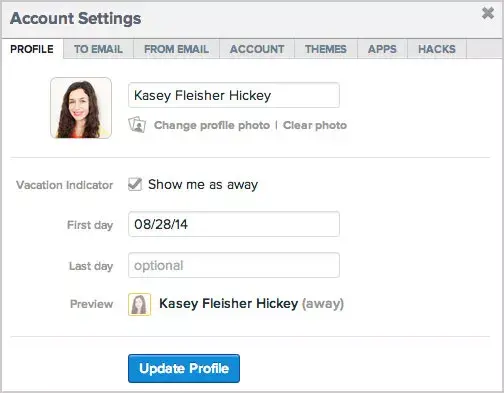
To enable your Vacation Indicator, simply go into your Account Settings and check the ‘Show me as away’ box under your profile picture. Select the dates you’ll be away, then hit ‘Update Profile.’
We hope you’re going somewhere fun.
![[Pemasaran Versi Musim Semi 2026] Gambar Hero](https://assets.asana.biz/transform/365f4526-36ae-48a9-b24e-d5835d7b1d9a/FY26-Spring-Blog-image-1578-x-1052?io=transform:fill,width:2560&format=webp)