


How Asana uses Asana to manage code reviews


One of the best parts of working for Asana is working in Asana. Asana teams and employees are fully bought into the Asana product, and nearly everything we do is tracked within Asana. It’s very common for newly hired employees to experience a bit of culture shock when they find out that it would be almost unheard of to receive an email from another Asana employee!
On the Engineering team, one of the most common workflows is reviewing and discussing code changes. We use Github to host our repositories, and use Github Pull Requests for code reviews. Code review is a major part of a Software Engineer’s job. Since Asana is the best way to keep track of tasks and make it clear who is doing what by when, it makes sense that we track code reviews within Asana. Since Asana Engineers rarely check their emails, the Github email notifications would largely go unnoticed.
To track code reviews in Asana, we wrote SGTM (Sounds Good To Me), an open-source app.
Why we built SGTM
SGTM operates as a Github Webhook that functions as a one-way sync from Github Pull Requests to Asana tasks. There are many benefits we get from this sync from Github →Asana:
SGTM assigns the task to the right person when there is actionable next steps
It can sometimes be ambiguous what the next action item is after a review. At Asana, we value having the clarity of who is doing what by when. So when someone is assigned a Pull Request, an Asana task gets assigned to them. Once reviewed and approved or changes are requested, the Asana task gets assigned back to the author of the Pull Request, letting them know that they are responsible for the next step.
GitHub Pull Requests have an assignee, but no due date
SGTM automatically sets the due date based on Rules that match our internal expectations of when code reviews should be addressed.
Useful context lives in our Pull Request conversations, which weren’t searchable within Asana
Having the Pull Request comments in Asana lets us use Asana to search for historical context and use the Asana Work Graph to search through pull request comments and descriptions without leaving our tool.
Not every Asana employee has a GitHub account with access to our codebase
Not everyone has access to the codebase, but there may be a discussion in the Pull Request that pertains to them. In Asana, those individuals can be added as collaborators on the task to follow the conversation even if they don’t have a Github account. This way, Engineers can keep Product Managers, Designers, and others in the loop without broadening the scope of people who have access to our source code.
Asana Engineers work out of Asana, and not email
SGTM integrates into the workflow that works best for us, which of course is Asana!
We want to automate our processes and eliminate “work about work”
We’ve added features to SGTM so that it also has the ability to:
Optionally auto-merge the Pull Request once approved and tests pass (based on Github labels)
Optionally complete relevant Asana tasks once the Pull Request has been merged
… and more to come! (See below.)
How we built SGTM
SGTM is written in Python, and uses Asana’s API alongside GitHub’s GraphQL API to connect the two platforms together, along with a few AWS services to run the app and maintain state. Some of these AWS services are S3, Lambda, DynamoDb, API Gateway, and Cloudwatch. The full infrastructure of the app can be found here.
To share a self-hosted application with the world, we use Terraform to manage and deploy the application and infrastructure. This way, we can open source and share the code as well as the infrastructure behind the code.
How we use SGTM at Asana
Here’s an example GitHub Pull Request that an Engineer would open:
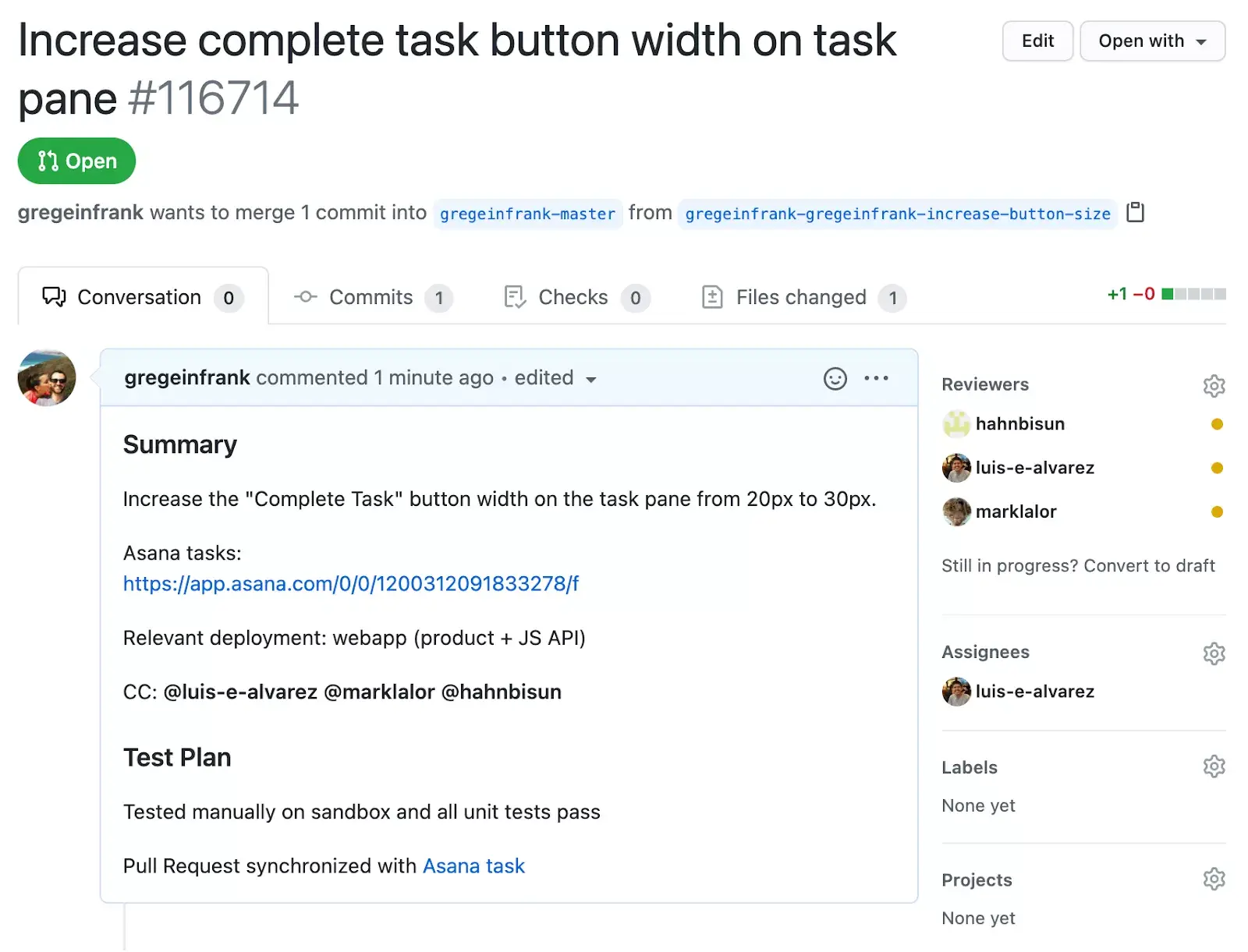
Notice that the bottom of the description notes, “Pull Request synchronized with Asana task”. That message is auto-generated by SGTM once the Asana task is created. Now let’s take a look at what the task looks like in Asana:
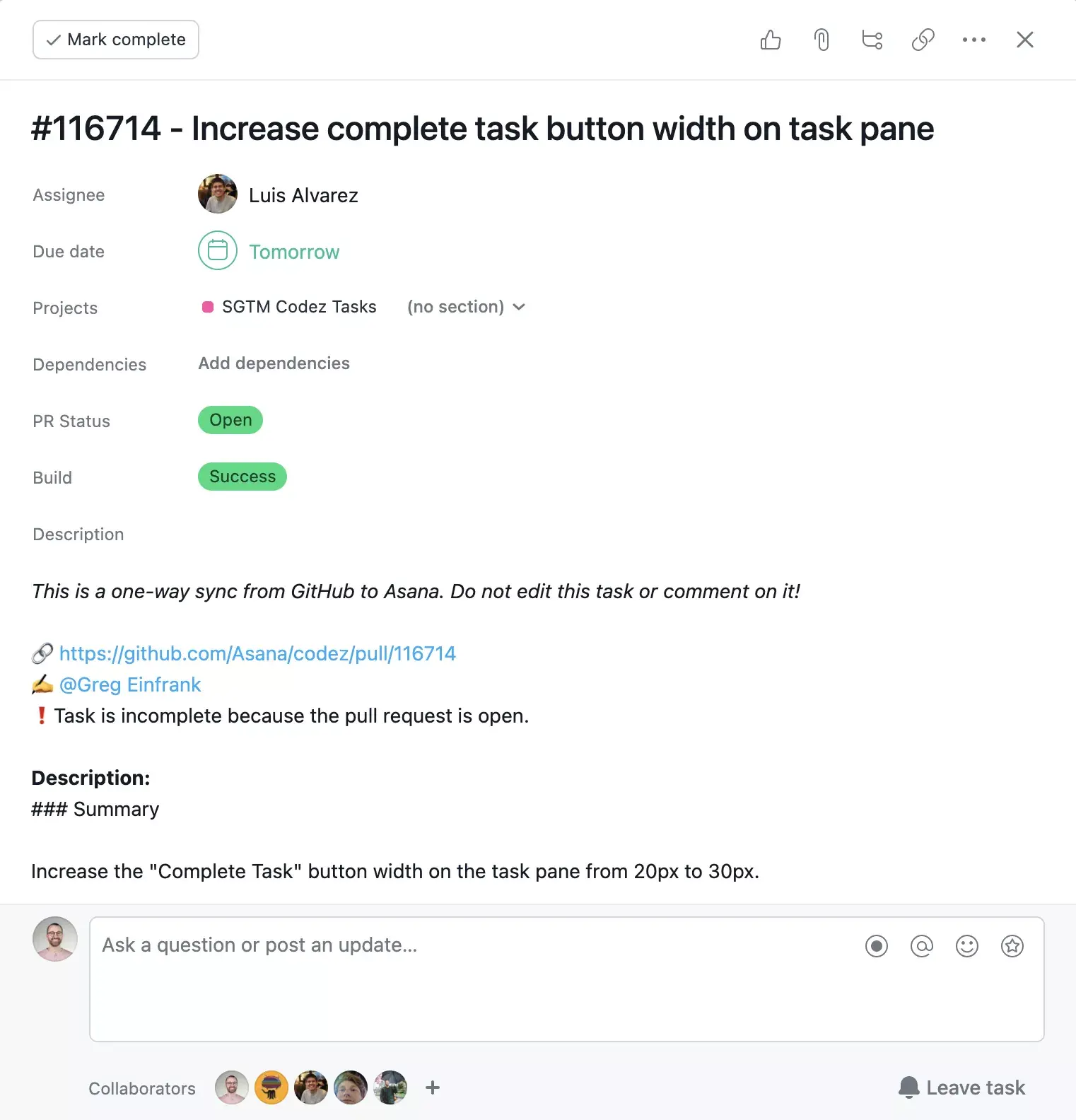
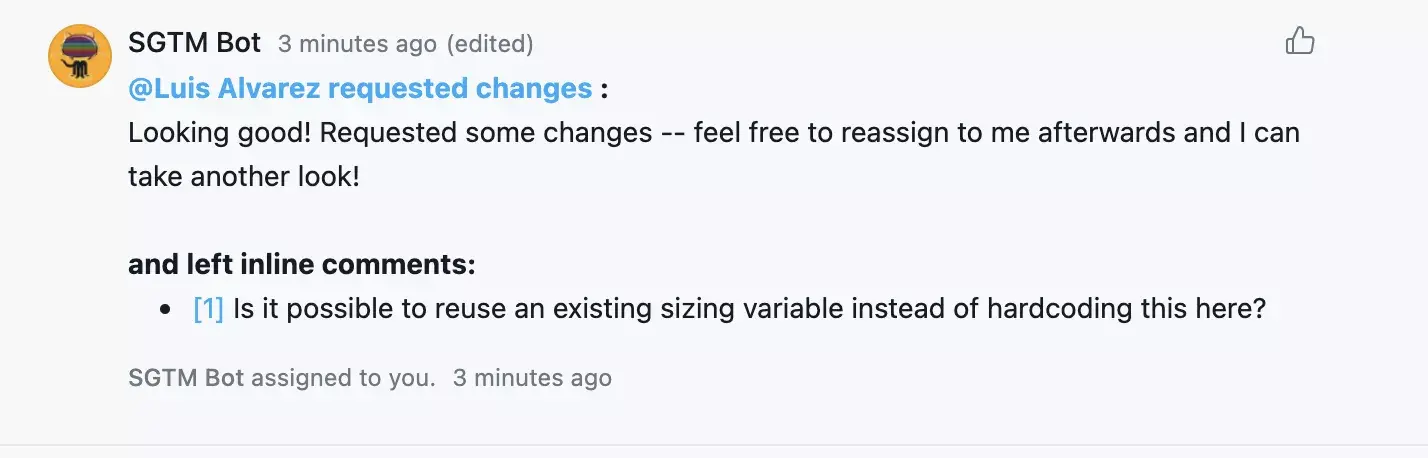
After a review, the comments (including inline comments) get synchronized back to the Asana task as comments, and can the task can be re-assigned back to the author for next steps.
Use and contribute to SGTM—it’s open source!
If SGTM sounds like something your team would be excited to use, head over to https://github.com/Asana/SGTM#setup for instructions on how to set up the app for your own repository! We’re also happy to take feature requests and pull requests to improve SGTM and add new functionality.